Model: Plextor PX-716A 16x DVD±RW
Manufacturer: Plextor
Provided By: Plextor America
If you talk to anyone about optical storage, the name Plextor is guaranteed to come up. As a leader in the storage industry for more than a decade, they've produced some of the best optical drives available. The quality, performance and features these drives offer have made them favorites among consumers and professionals alike. To keep ahead of the competition, Plextor has continued to lead the way, bringing cutting edge technologies to market. Today, their product lineup includes a number of high performance CD and DVD writers, many with features found nowhere else.


This fall, Plextor announced their long awaited 16x DVD±RW, the PX-716A. Featuring some of the fastest reading and writing speeds available, the PX-716A is capable of 16x DVD±R, 8x DVD+RW and 4x DVD-RW writing speeds and has a maximum DVD read speed of 16x. More importantly, it's the first drive from Plextor to support the DVD+R DL format. Out of the box, the PX-716A can write to DVD+R DL media at 4x. However, thanks to a free firmware update, the drive can write to select media at 6x. The PX-716A also has many of the features found on the PX-712A, along with a number of new ones like AutoStrategy. Developed by Taiyo Yuden, AutoStrategy improves the compatibility of new or unsupported media by developing writing strategies on the fly.
With features and specs like this, Plextor's new DVD writer sounds like it has a lot of potential. To give you an idea of what to expect from the PX-716A, we'll take a look at some of its features and then see how it compares to the 16x DVD±RW drives from Sony, NEC, and Pioneer. Can the PX-716A deliver the features and performance we've come to expect from Plextor? Is it the fastest DVD writer around? Keep reading as we find out.
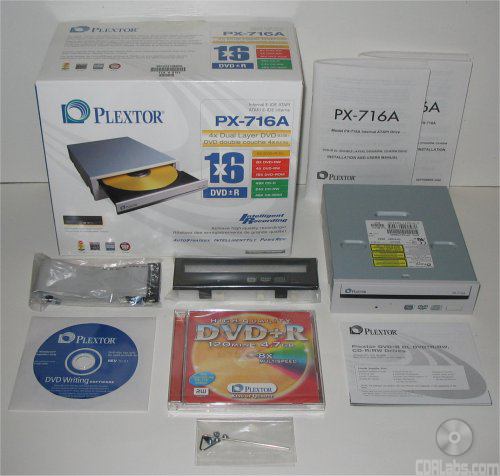
What's in the box?:
- Plextor PX-716A 16x DVD±RW Drive
- Plextor PX-716 Installation And Users Manuals
- Quick Reference Guide
- Plextor DVD Writing Software - Revision 10.01
- 1 Plextor 8x DVD+R Disc
- IDE Cable
- Black Bezel
- Bag of screws and emergency eject tool
Physical Features:
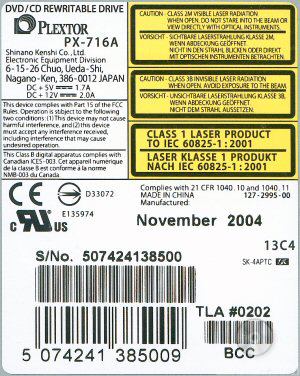
The drive Plextor sent us for this review was manufactured in November of 2004 and had firmware version 1.02. It was also manufactured in China and had a TLA# of "0202".For this review we used firmware versions 1.03 and 1.04.
From the front, the PX-716A looks very similar to Plextor's 12x DVD±RW drive, the PX-712A. While there are a few cosmetic differences, both drives share the same basic design including the black stripe along the front of the tray. Like its predecessor, the PX-716A also has its share of logos. Along with the large "Plextor" logo, you can see a few showing off its support for DVD+R DL, DVD-R/RW and Ultra Speed CD-RW media.


The PX-716SA also has a single LED, which does double duty for both reading and writing activities.This LED lights up yellow when reading, ejecting or initializing a disc, green when its Buffer Under Run Proof is working, and amber when writing. Like with Plextor's other drives, you can determine the PX-716A's writing speed by monitoring the blink rate of the LED.
| Blink interval | Write Speed | ||
| Amber, 40ms |
|
||
| Amber, 80ms |
|
||
| Amber, 150ms |
|
||
| Yellow | Eject, Initialize, Read | ||
| Green | Standby, Buffer Under Run Proof is working |
||
| Yellow-Green-Amber | Write setting created by AutoStrategy |
While the vent along the top has been expanded a little, the rear of the PX-716A is otherwise very similar to Plextor's other ATAPI drives.By looking at the picture below you can see the drive's IDE interface, power connection and audio output connectors.

Starting from the left of the IDE connection you'll see the jumper switch for master, slave and cable select. By default it comes set as master. Next to the jumper block is the analog audio connector. The connector on the far left is the digital audio output.

Technical Specs:
Most of the specs below have been taken from Plextor's website and the manual that came with the drive.
| Plextor PX-716A 16x DVD±RW | |
| CD Write Speeds | 48x (CAV) 32x (P-CAV) 16x, 8x, 4x (CLV) |
| CD Rewrite Speeds | 24x (P-CAV) 10x, 4x (CLV) |
| DVD+R Write Speeds | 16x (CAV) 12x, 8x (P-CAV) 6x, 4x, 2.4x (CLV) |
| DVD+RW Write Speeds | 8x* (P-CAV) 6x, 4x, 2.4x (CLV) |
| DVD-R Write Speeds | 16x (CAV) 12x, 8x (P-CAV) 6x, 4x, 2x (CLV) |
| DVD-RW Write Speeds | 4x, 2x, 1x (CLV) |
| DVD+R DL Write Speeds | 6x*, 4x, 2.4x (CLV) |
| DVD-R DL Write Speeds | 6x**, 4x**, 2x* (CLV) |
| CD Read Speeds | 48x, 40x, 32x, 24x (CAV) 8x, 4x (CLV) |
| DAE Speeds | 40x, 32x, 10x (CAV) 8x, 4x (CLV) |
| DVD Read Speeds | 16x Max (DVD-ROM Single Layer) 12x Max (DVD-ROM Dual Layer) 12x Max (DVD-R/RW) 12x Max (DVD+R/RW) 8x Max (DVD+R DL) |
| Buffer Size | 8 MB |
| Access Times |
100 ms (CD) 150 ms (DVD) |
| CD Formats | CD-DA CD-ROM Mode-1 CD-ROM Mode-2 CD-ROM XA CD-Extra Video CD Photo CD Multi-session CD-I CD+G CD-Text CD-R CD-RW |
| DVD Formats | DVD-ROM DVD-Video DVD-R/RW DVD+R/RW DVD+R DL DVD+VR DVD-VR |
| CD Recording Modes | Track At Once Session At Once Disc At Once Variable and Fixed Packet Writing |
| DVD+R Recording Modes | Disc At Once Multi-session Incremental Recording |
| DVD+RW Recording Modes | Random Access Write Sequential Write |
| DVD+R DL Recording Modes | Disc At Once |
| DVD-R Recording Modes | Disc At Once Incremental Recording Multi-border Recording |
| DVD-RW Recording Modes | Disc At Once Incremental Recording Multi-border Recording Restricted Overwriting DRT-DM |
| DVD-R DL Recording Modes | Sequential Write |
**The 1.05 firmware adds support for 6x DVD-R DL writing speeds.

While Plextor works hard to add support for as much media as they can, they can't possibly test all of it and include it in the firmware. For this unsupported, or unknown, media there is AutoStrategy technology. Developed by Taiyo Yuden, AutoStrategy automatically tests and catalogs unknown media, developing a writing strategy on the fly.

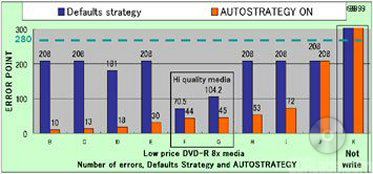
The way AutoStrategy works is fairly straight forward. When you insert an unknown DVD+R or DVD-R disc (rated at 4x or faster) into a drive like the PX-716A, it will read the manufacturer ID and perform an OPC, or Optical Power Calibration, test to determine the correct laser power. AutoStrategy then checks to see if the disc's information is already stored in the drive's memory. If not, it will do a trial write and start calculating a writing strategy. From here, the PX-716A will start writing the data to disc. During this time, AutoStrategy continually monitors the process via ROPC and PoweRec and will modify the writing strategy if need be. Once done, it will save this writing strategy to memory.
The first time AutoStrategy calculates a writing strategy for a disc, it can add anywhere from two and a half to four minutes to the total writing time. With subsequent burns, the process is much faster. AutoStrategy simply identifies the disc, pulls the writing strategy from memory and does a trial write, a process that takes about 15 seconds.
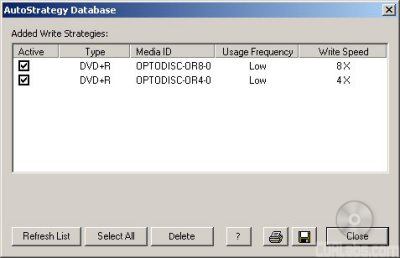
While the PX-716A holds a maximum of 31 writing strategies, you don't have to worry about filling up the drive's memory. According to Plextor, AutoStrategy automatically erases little used entries to make room for new ones. Otherwise you can view, deactivate or delete the writing strategies manually using PlexTools Professional.
Plextools Professional also lets you run a basic media quality check to determine whether or not you will see good results at the selected speeds. Most of the results it gives are pretty self explanatory.
 The Good |
 The Bad |
The Ugly

The big question here is whether or not AutoStrategy works. To find out, we'll take a closer look at this technology in the performance section of this review.
The best reading and writing quality occurs when the angle between the disc and laser is 90 degrees. If a disc is warped or uneven, the laser beam will not be positioned correctly. To remedy this, Plextor developed Intelligent Tilt technology. By using a liquid crystal in the optical pickup and a three dimensional tilt actuator mechanism, Intelligent Tilt ensures that the focal point of the laser is positioned correctly. Plextor claims that this enables high quality recordings with any media, including double layer discs. The graph below represents the Jitter levels with Intelligent Tilt both on and off.


For the PX-716A, Plextor has brought back their PoweRec technology. PoweRec stands for Plextor Optimized Writing Error Reduction Control. This technology checks the quality of the media and automatically selects the optimum writing speed. When you insert a disc into the drive, PoweRec identifies the media and compares it to a large database of supportedmedia stored in the firmware. This database includes information about the media, including its maximum recording speed.If not supported, the drive will run OPC tests to check the characteristics and current conditions. From this it can choose the best laser power and speed for the media being used.

PoweRec also monitors the media on the fly by checking the writing quality at set intervals. If it detects that the drive is creating too many write errors, it will modify the writing strategy and laser power, keeping the writing quality at an optimum level.
Plextor's new DVD writer also features their VariRec, or Variable Recording, technology. This technology not only improves the quality of recorded audio and data by minimizing jitter and reducing error rates, it also allows the user to manually adjust the drive's laser power.

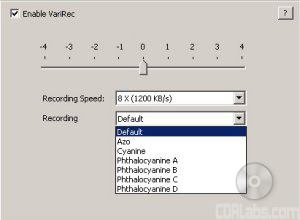 VariRec CD |
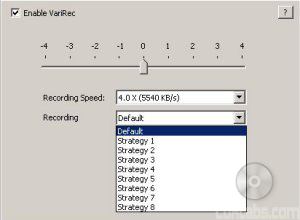 VariRec DVD |
Basically a setting of 0 is what VariRec believes the laser power should be for the CD or DVD media currently being used. Of course, you can fine tune this even further by manually adjusting the laser power. By doing this, as well as running comparison tests, you can find the setting that delivers the best results for your DVD or CD player.
The PX-716A also offers a number of expanded VariRec features, including an 8x recording speed for CD-R discs. If you have PlexTools Professional, you can also adjust the laser power up to 4 degrees in either direction and choose a custom recording strategy depending on media being used. Just keep in mind that VariRec only supports write once media (DVD±R and CD-R) and writes in either Track-at-Once (TAO) or Disc-at-Once (DAO) mode.
To put it simply, Plextor's GigaRec technology can increase the capacity of your CD-R media by up to 40%. For example, if you're using a standard 80 minute disc that is 700MB in size, GigaRec will let you squeeze almost 1GB of data, or 111 minutes of audio, onto it.

While this technology has been around for a number of years, Plextor has been pretty tight lipped about how this works. According to some of the documentation Plextor has provided, GigaRec ignores the information encoded onto the CD (manufacturer, maximum write capacity, etc) and compresses the size of the pits and lands on the disc. By doing this, it can "extend" the capacity of the media.

GigaRec also lets you burn a disc at a lower than rated capacity. For example, it can take a disc image that would normally be only 490MB in size and "stretch" it so that it will take up an entire 700MB disc. This changes the length of the pits and lands, which can increase accuracy and data response. According to Plextor, this can result in a truer burn.
While GigaRec has its advantages, it also has a few limitations. When activated, the maximum writing speed is limited to 8x and the only recording mode available is DAO (Disc At Once). On top of that, the drive's buffer underrun protection is turned off. Even then, GigaRec's biggest limitation is compatibility. While discs recorded with GigaRec are playable in most of Plextor's newer CD-RW and DVD±RW drives, they might not work in drives from other manufacturers. From past experiences, we've found that the higher the GigaRec rate, the lesser the chance the disc was going to be readable by other drives.
Plextor's SecuRec technology lets you protect the data on a CD-R disc with a password. To view the contents of the CD, the user must enter the correct password first. This password can be entered through PlexTools Professional or the SecuViewer client.


SecuRec only supports data CD-R discs written using the Disc At Once recording mode. You will not be able to protect DVD discs, audio CD's or data discs written using Track At Once.
While Plextor's new DVD writer is normally pretty quiet, the sound coming from the drive can be reduced even further using Silent Mode. By enabling this feature through PlexTools Professional, you can modify the drive's tray load/unload speed, spin up/down speed and write/read speeds.

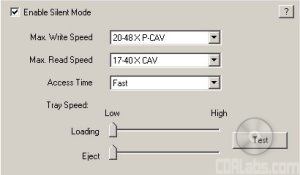 Silent Mode CD |
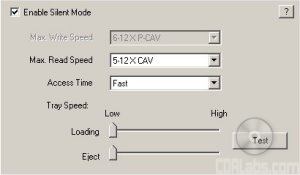 Silent Mode DVD |
The various options are self explanatory. The top two drop-down menus let you set the PX-716A's maximum reading and writing speeds. Just remember that with the Silent Mode on, the fastest CD read speed available is 40x, even with SpeedRead enabled. The drop-down menu for the access time gives you three options: Fast (60ms), Middle (80ms) and Slow (120ms), with the quietest setting being Slow. Last but not least, the two slider bars along the bottom can be used to adjust the drive's loading and eject speeds.
PlexTools Professional also includes a number of tests that can be used to measure and display the characteristics of the drive and media being used. Along with reading and writing transfer rate tests, it includes a system to check the writing quality of your CD's and DVD's. Called Q-Check, this system can be used to measure a number of different things, including C1/C2 errors, focus and tracking errors, beta/jitter rates and PI/POF errors.

The first function of Q-Check is to measure the number of C1/C2 errors on a CD. After clicking the Start button, the test will begin. The graph you see represents the C1 error measurement (BLER or BLock Error Rate) and C2 error measurement (E22).
Q-Check C1/C2 Test

If your discs have C1 errors, don't worry. They are normal and in most cases are easily correctable. What you don't want to see are C2 errors. While these errors can be caused by things like scratches and finger prints, they can also be an indication of poor, or low quality, media. If you see CU errors after running this test, you might as well toss the disc in the trash. These are the errors still present after C2 level correction has done its job.
Secondly, you have the focus and tracking error test, or FE/TE test. While the other Q-Check tests can measure the writing quality, this one reports on the mechanical characteristics of the blank media you're trying to use. Keep in mind that this test only works with CD-R, DVD+R and DVD-R discs. Rewritable and double layer media is not supported.
Q-Check FE/TE Test
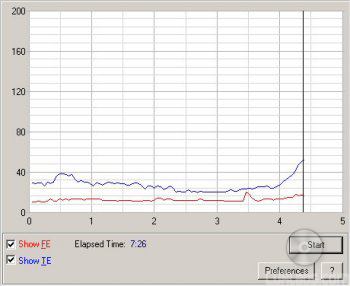
The Focus Error represents how accurately the laser can stay focused on the disc. With a good disc, the number of focus errors will stay very low across the entire disc. The Tracking Error indicates how well the laser can follow the groove manufactured into the disc. For the best results, this line on the graph should remain relatively flat.
Q-Check can also be used to measure jitter and beta rates. When you record a CD or DVD, the drive burns a series of small "pits" into the dye on the bottom of the disc. The unburned areas between the pits are known as the "lands." The length of the pits and lands is set in the Red Book Standard. Any variation between what has been set in the standard and what has been written to the disc is called "Jitter". To put it simply, the lower the jitter rate the better.
Q-Check Beta/Jitter Test

The Beta rate represents the transitions between the pits and lands. If the laser power is too high, the drive will create pits that are too large. If the laser power is too low, the pits and lands can become blurred. In both cases, the result is the same: a disc that might not be readable in all drives. A Beta rate represented by a horizontal line would indicate a disc in perfect balance.
The PX-716A also supports PI/PO testing. Where the C1/C2 tests reported the writing quality of CD's, this Q-Check test does the same for DVD's. With PlexTools Professional you can perform four separate tests: SUM8, SUM1, Basic and Burst.
Q-Check PI/PO SUM8 Test

Along with the number of POF (Parity Outer Fail) errors, the SUM8 test will report the number of PI (Parity Inner) errors per 8 consecutive blocks. These are the number of errors before correction and are normal. As long as they stay within acceptable limits, they can usually be corrected by the drive. POF errors are a different story altogether. You don't want to see these uncorrectable errors at all since they can cause data loss.
Q-Check PI/PO SUM1 Test
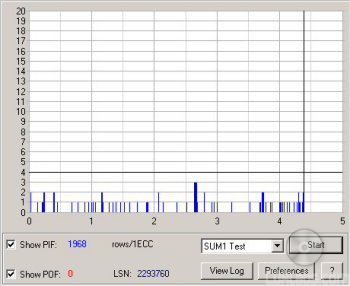
Where the SUM8 test reported the number of PI errors before correction, the SUM1 test measures the number of errors after correction, or PIF (Parity Inner Fail). While not as bad as POF errors, they can decrease the playability of a disc.
Q-Check PI/PO Basic Test
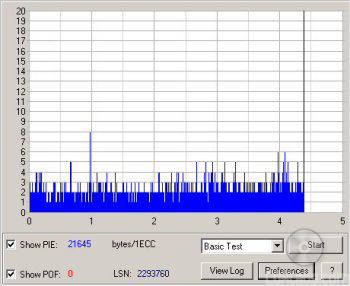
Q-Check also includes a Basic PI/PO test. Like the Sum1 test, the ECC sum is set to 1. However, instead of measuring the number of PIF errors, the Basic test counts the number of bytes corrected during the PI stage.
Q-Check PI/PO Burst Test

Last but not least, the Burst Test checks for consecutive errors that can influence the error correction. As you can see, it not only reports the number of PIE and POF errors per 8 consecutive blocks, it also gives you the number of POE, or Parity Outer Errors.
With the PX-716A, Plextor introduced yet another Q-Check test. The TA, or Time Analysis, test "measures the quality of the written DVD media by checking the pits and lands for compliance with the DVD specifications." It compares the time intervals between two successive pit/land transitions on the disc to those listed in the standard. The test does this for all lengths between 3T and 11T, and 14T.

Before you run the TA test you have to choose the area of the disc you want tested (inner, middle, outer) and the layer if you're using DVD±R DL media. Once the test is run, you'll see a graph like the one below.
Q-Check TA Test

According to Plextor, a disc with good writing quality will produce graphs with narrow peaks and little peak shift. Ideally, the tops of the peaks should lie along the green axes. As the writing quality gets poorer, the peaks will get wider and eventually run together. In case you're not sure where your results fall, Q-Check automatically scores the jitter and peak shift, giving an overall quality indicator ranging from Bad to Excellent.
More Features:
By looking at the picture below, you can see that Plextor's new DVD writer is identified as a "PLEXTOR DVDR PX-716A".
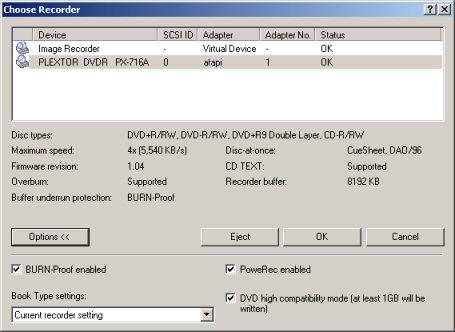
The Nero screenshot also shows that the PX-716A has a maximum CD writing speed of 48x a huge 8192KB buffer. This buffer is also backed up by Sanyo's BURN-Proof buffer underrun protection. According to Nero, the drive can also write CD-Text and overburn. When testing the drive's capacity, it had no problems overburning up to 99 minutes with our CompUSA media.
Like the PX-712A, the PX-716A can do EFM encoding correctly. Using CloneCD version 4.2.0.2 with AWS disabled, Iwas able to reproduce older SafeDisc 2 protected titles like Max Payne along with some protected by SafeDisc 2.51 like Serious Sam: The Second Encounter.
Here is a screen shot from Nero's InfoTool. This program queries the drive to see what its reading and writing capabilities are. InfoTool had no problems detecting the PX-716A's maximum reading and writing speeds, recording modes, buffer underrun protection and 8MB buffer. Take note that unlike the PX-708A and PX-712A, the PX-716A does not support the Mt. Rainier format.
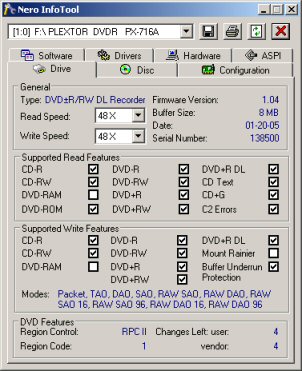
InfoTool also shows that the PX-716A is a RPC-2 DVD drive. This means that the drive's region is stored in the firmware. The drive's region can be changed five times and after that it cannot be changed anymore. A patched RPC-1 firmware can be downloaded here. Just keep in mind that it is not supported by Plextor nor by CDRLabs. Use it at your own risk.

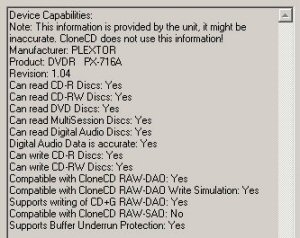
While InfoTool gives us a quick glance at the PX-716A's features, DVDINFOpro provides a little more information on some of the drive's reading and writing capabilities. By looking at the screenshot above you can see that Plextor's new drive can both read and write DVD+R DL media, but does not support the Mt. Rainier format for CD-RW or DVD+RW.

The PX-716A also supports a feature called "bitsetting." Using programs like Nero, CD Speed or PlexTools Professional, you can set the book type of both DVD+R and DVD+R DL media to "DVD-ROM". Oddly enough, the drive does not let you set the book type of DVD+RW discs.
Plextor has included a DVD full of software with the PX-716A. Along with Dantz Retrospect Backup, this disc contains a number of applications from Roxio including Easy Media Creator 7 Basic DVD Edition, PhotoSuite 7 and DVDMax Player 2.0.
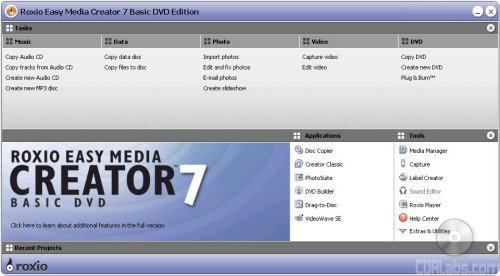
Roxio Easy Media Center 7 Basic DVD Edition - Easy Media Center 7 is the main CD/DVD mastering program included with the PX-716A. With this software, users can create their own CD's and DVD'sor make backups of existing discs.
Along with a long list of tasks, the menu above shows a list of components that make up the Easy Media Creator 7 suite. The first component you see is the Disc Copier. This software lets you make copies of your non protected CD's and DVD's quickly and easily. Disc Copier's advanced mode will even display the video, audio and extras on your DVD-Videos, so that you can remove the unwanted parts.
DVD Builder is Roxio's DVD authoring application. With this program you can easily capture, edit and then burn your favorite videos to CD or DVD.DVD Builder will also allow users to add transitions and background music, create animated menus, and organize clips and photos into custom slide shows.
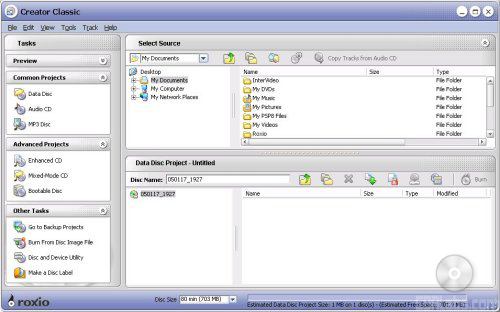
Easy Media Creator 7 also includes what Roxio calls "Creator Classic." While not as robust as disc mastering software like Nero Burning ROM, Creator Classic will have you creating your own custom CD's and DVD's in no time.
Roxio also includes their packet writing software, Drag-to-Disc, with Easy Media Creator 7. Drag-to-Disc lets a person write to CD or DVD media the same way they would a floppy disk or their hard drive. It also supports most CD and DVD media, including write once formats like CD-R, DVD-R and DVD+R.
Last but not least you have VideoStudio SE. This easy to use video editing software lets you trim your video clips and spruce them up by adding things like transitions, titles, music, and special effects. When you're done, simply burn your movie to disc.
Roxio PhotoSuite 7 - With Roxio's PhotoSuite 7, you can repair, enhance and share your digital photos. This software includes a number of automated and advanced photo editing tools that will let you easily crop and rotate your pictures, remove things like red-eye and wrinkles and add text and special effects.
When you are done editing your photos, PhotoSuite will let you print them out, save them in an album or share them online. It even will even let you email them without leaving the program.
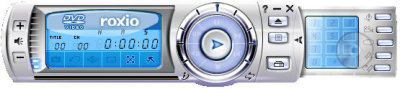
Roxio DVDMax Player 2.0 - Plextor's new drive also comes with Roxio's DVD playback software, DVDMax Player 2.0. Based on CyberLink's PowerDVD, DVDMax offers a complete set of navigation commands, including advanced features like multi-angle viewing, multi-language and subtitle selection, digital zoom and even parental control.
Along with DVD movies, DVDMax can be used to play back your VCD's, SVCD's or whatever video files you might have on your hard drive. Unfortunately, the version of DVDMax included with the PX-712A only supports 2 speaker output. If you want to take advantage of DVD's encoded with DTS or use Dolby Pro Logic II, you'll probably want to pick up a retail copy of PowerDVD or WinDVD.
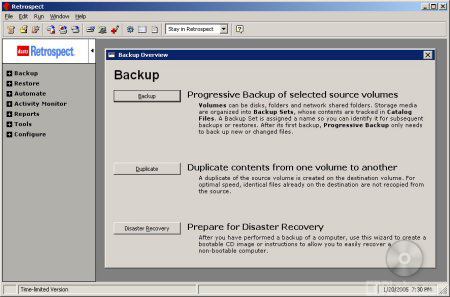
Dantz Retrospect Backup Professional 6.5 - Plextor has also included a trial version of Retrospect Backup 6.5. This program lets you backup any of the drives or volumes in your computer to a number of storage devices, including CD and DVD writers.
Backup jobs can be scheduled to run at regular intervals so the data is always protected. Retrospect also supports compression, encryption and disaster recovery features.Believe it or not, Retrospect will even backup other computers on your home or office network. While all of this sounds great, Plextor has only included a 30 day trial, and not the full version of this program.




Like Plextor's previous DVD writers, the PX-716A definitely isn't short on features. Along with support for most CD and DVD formats, it sports some of the fastest reading and writing speeds available. The PX-716A is capable of 16x DVD±R, 8x DVD+RW and 4x DVD-RW writing speeds and can read DVD's at speeds as high as 16x. On top of that, it's one of the first drives to support both the DVD+R DL and DVD-R DL formats. Of course, the PX-716A isn't just about speed. The drive also has many of the technologies we've come to expect from Plextor along with new ones like AutoStrategy and Intelligent Tilt. With all of the features being offered here, it's easy to see why the Plextor PX-716A gets the full 10 points for the features section of this review.
Like the other Plextor drives we've reviewed, the PX-716A was very easy to install. From start to finish, it took me only a few minutes to get it up and running. After taking the drive out of the box, I left the jumper set to master and installed it on the secondary IDE chain by connecting the IDE cable and power connector. When I turned on the computer the BIOS detected it as a drive supporting UDMA 66. The only thing left to do was to go into Device Manager and make sure DMA was enabled. With a drive like the PX-716A, enabling DMA is a must if you want to get the best reading and writing performance possible.
Software Installation:
The PX-716A comes with a CD full of software from Roxio and Dantz. If you have autorun enabled on your computer, the menu shown below will appear when you insert the disc. From here you can choose to install the Easy CD & DVD Creator (Easy Media Creator) suite, DVD Max, PlexTools Pro or RetroSpect Backup. Simply click the name of the application you want to install, and its setup program will start up automatically.
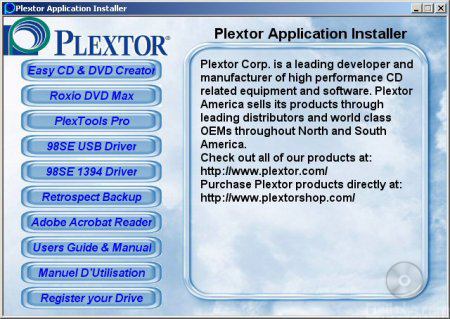
I was a little surprised by the lack of installation options available for Roxio's Easy Media Creator suite. Unlike earlier versions of this software, you are not given the choice of doing a full or custom installation. After selecting your preferred language, the setup program automatically installs the entire suite. Personally, I'd like to be able to choose whether or not to install things like Drag-to-Disc or PhotoSuite, but as integrated as the Easy Media Creator suite is, it might not be possible to omit these components.
Installing the rest of the bundled software is pretty straightforward. In most cases, it's as simple as choosing the location where you want to install the program, clicking next a few times and waiting for the setup program to copy the files over. After rebooting you'll be able to do things like play DVD's, control your drive's functions and backup the data on your computer.
Documentation:
For the North American market, the PX-716A comes with not one, but two, fairly large user manuals in your choice of English or French. The manual starts out by getting the user familiarized with their new DVD writer. The first section goes over the drive's capabilities, features and system requirements. Plextor has also provided some pretty good diagrams showing all of the different buttons and connectors located on the front and back of the drive. Everything is labeled clearly and the functions of each are easy to understand.
From here, the manual jumps right into the physical installation of the PX-716A. It starts out by going over how to open up your computer and determine your existing IDE configuration. If you're not sure about how to configure your computer, Plextor has provided a few examples along with the corresponding jumper settings. For more experienced users, there are also a few recommended configurations that will get you up and running quickly. The rest of the installation section walks you through the process of mounting the drive in your computer and hooking up the cables. Unfortunately, Plextor doesn't have any information on how to check whether or not the PX-716A is recognized by the OS or do things like enable DMA.
The nextfew sections of the manual cover a number of topics including how to use and maintain the PX-716A. Plextor has provided a lot of good information on some of the more advanced features like GigaRec, SecuRec, VariRec and the Q-Check tests. However, I must admit that I was a little disappointed with the section on AutoStrategy. As one of the PX-716A's biggest features, I expected to see a little more information. The manual also has a few short sections on firmware updates and the drive's self test diagnostics. You can use these diagnostics to see if the problem you are having is with the drive or somewhere else. Last but not least, you have a list of specifications and recommended media for the PX-716A.
The PX-716A also comes with a small, fold out "Quick Reference Guide." On one side of the guide Plextor has provided some instructions that walk you through the installation process. While brief, they cover all the basics including how to set the jumpers, hook up the cables and install the drive in your computer. If you flip over the guide, there are instructions on how to install and use some of the bundled software.
When it comes down to it, installing the PX-716A and the bundled software was as easy as they come. For those that might need a little help, the documentation Plextor has provided is quite good and contains a lot of information that should satisfy the needs of both novices and professionals alike. Personally, I would have liked to have seen some information on how to enable DMA in Windows as well as a few more options when installing the Roxio suite. However, this didn't keep the PX-716A from scoring a 9 out of 10 for the installation portion of this review.
While CPU, memory, OS and other variables don't often make a huge difference, there are some nonetheless. We have a computer that is used only for testing hardware. We do this so all tests can be compared reliably.
Test System:
| CPU: | AMD Athlon 64 3200+ 2.0GHz | |
| Motherboard: | ASUS K8V SE Deluxe with BIOS 1003 | |
| Memory: | 2 x 256MB Kingston PC3200 | |
| Video Card: | XFX NVIDIA GeForce FX5200 - ForceWare v56.72 | |
| Hard Drive: | Hitachi Deskstar 7K80 80GB SATA 7200RPM | |
| Operating System: | Windows XP SP1 - VIA Hyperion 4in1 v4.51 |
For DVD writers the performance tests are broken down into four sections: CD read, CD write, DVD read and DVD write tests. Each benchmark test has been run three times. The score given is an average of the three. DMA has been enabled in device manager for all IDE devices supporting it.
CD Read Tests: For the read performance section of the CD-ROM benchmarks, CD WinBench 99 v3.0 and CD Speed v3.61 are used to test read speeds, seek times and CPU usage. For DAE testing both CD Speed and CD DAE are used. CD Speed is used to give an overall DAE speed rating and CD DAE is used to give the track by track extraction speeds and to check the extracted tracks for errors the drive may have created.
CD Write Tests: To test the write speeds, Nero Burning Rom is used to write 650MB and 700MB to our test media. Times are recorded. To test rewrite scores, Nero is used again to time how long it takes to write 400MB of random files and directories. Then Sonic's DLA is used to test packet writing speeds. The same files are copied and pasted in Windows Explorer and timed.
DVD Read Tests: For the read performance section of the DVD benchmarks CD Speed v3.61 is used to test read speeds, seek times, and CPU usage.
DVD Write Tests: To test the DVD write speeds, Nero Burning Rom is used to write 4GB to our test media. Times are recorded. Then Sonic's DLA is used to test packet writing speeds. The same files are copied and pasted in Windows Explorer and timed.
Editors Note: On 4/19/05 this review was updated to include some DVD-R DL writing tests.
CD Winbench 99 Scores:
| Plextor PX-716A |
Sony DRU-710A |
Pioneer DVR-A08XL |
NEC ND-3500A |
|
| CD Winbench 99 | 2065 KB/sec | 2155 KB/sec | 1227 KB/sec | 2053 KB/sec |
| Transfer Rate: Inside | 3140 KB/sec | 2870 KB/sec | 2135 KB/sec | 3210 KB/sec |
| Transfer Rate: Outside | 6360 KB/sec | 6570 KB/sec | 5720 KB/sec | 6345 KB/sec |
| Random Access Time | 96ms | 113ms | 124ms | 111ms |
| CPU Utilization | 0.31% | 0.24% | 0.25% | 0.40% |
The CD Winbench test is as close as we can get to testing every day usage. It fires off eight different applications using scripts. This tries to mimic the activities of a person loading these programs onto their own computer.
Plextor's new DVD writer performed pretty well in our CD Winbench tests. While the PX-716A's overall score wasn't as high as the Sony's, it had a low access time and some very good transfer rates. It started reading at 20.9x (3140 / 150) and reached a maximum speed of about 42.4x (6360 / 150) on the outside.
CD Speed v3.61 - Pressed CD:
For this test I used a pressed CD containing one Mode 1 data track. The disc is 74:38 in size and is full of data and directories.
SpeedRead On

SpeedRead Off
| Plextor PX-716A |
Sony DRU-710A |
Pioneer DVR-A08XL |
NEC ND-3500A |
|
| Transfer Speed Average: Start: End: |
35.46x 20.50x 46.90x |
36.50x 21.29x 48.27x |
31.26x 18.16x 41.34x |
35.46x 20.43x 46.89x |
| Seek Times Random: 1/3: Full: |
102ms 120ms 172ms |
118ms 128ms 220ms |
127ms 150ms 290ms |
114ms 138ms 196ms |
| CPU Usage 1x: 2x: 4x: 8x: |
0% 1% 2% 3% |
1% 2% 4% 7% |
3% 2% 5% n/a |
0% 1% 2% 5% |
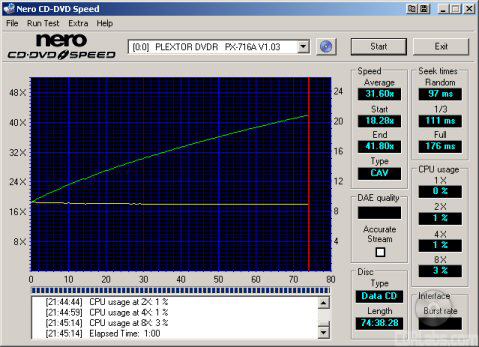
While Plextor's new DVD writer reads pressed discs at 40x, its maximum read speed can be bumped up to 48x by enabling SpeedRead. As you can see, the PX-716A came up a little short of this number in our tests. However, it had the best seek times out of the four drives here.
CD Speed v3.61 - CD-R Media:
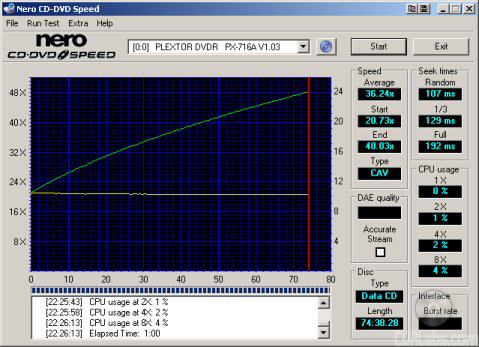
For this test I made a copy of our pressed test CD. I used 12x rated Memorex Gold 74 minute media for the tests.
| Plextor PX-716A |
Sony DRU-710A |
Pioneer DVR-A08XL |
NEC ND-3500A |
|
| Transfer Speed Average: Start: End: |
36.24x 20.73x 48.03x |
37.35x 21.46x 49.48x |
31.64x 18.22x 41.94x |
36.17x 20.78x 47.97x |
| Seek Times Random: 1/3: Full: |
105ms 130ms 191ms |
126ms 157ms 241ms |
131ms 155ms 298ms |
122ms 143ms 206ms |
| CPU Usage 1x: 2x: 4x: 8x: |
0% 1% 2% 4% |
1% 2% 4% 7% |
3% 2% 5% n/a |
0% 1% 2% 5% |
The PX-716A was a little faster when reading CD-R media. While this wasn't enough to top the drive from Sony, it had no problems reaching a maximum read speed of 48x in our tests. Looking at the other scores, you can see that the drive's seek times were again quite good.
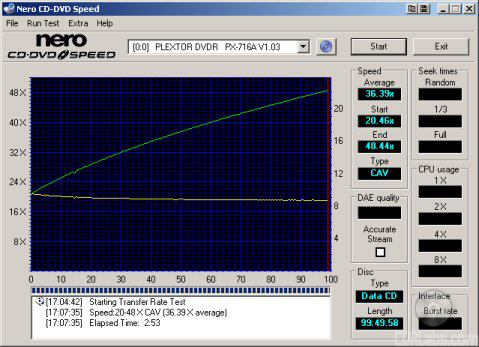
Plextor's new DVD writer had no problems recognizing our 99 minute CompUSA media. With SpeedRead enabled, the PX-716A read our test disc from start to finish, reaching a maximum transfer speed of 48.44x.
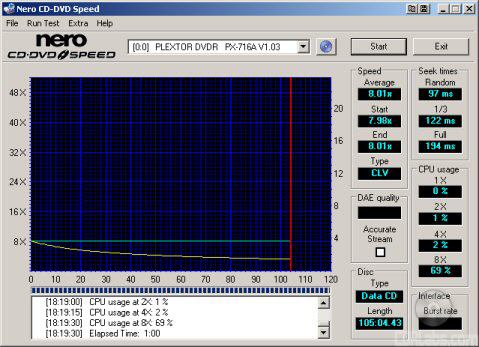
The PX-716A slowed down considerably when reading discs recorded with GigaRec. As you can see, the drive had a maximum read speed of only 8x when reading these discs.
CD Speed v3.61 - CD-RW Media:
For this test I made a copy of a pressed test CD. I used some PNY 80 minute CD-RW media for the tests.

| Plextor PX-716A |
Sony DRU-710A |
Pioneer DVR-A08XL |
NEC ND-3500A |
|
| Transfer Speed Average: Start: End: |
31.53x 18.32x 41.64x |
23.83x 13.92x 31.47x |
24.94x 14.57x 32.95x |
25.58x 14.90x 33.79x |
| Seek Times Random: 1/3: Full: |
101ms 118ms 174ms |
126ms 157ms 235ms |
130ms 151ms 289ms |
128ms 142ms 211ms |
| CPU Usage 1x: 2x: 4x: 8x: |
0% 1% 2% 4% |
1% 2% 4% 8% |
1% 1% 2% n/a |
0% 1% 2% 5% |
The PX-716A's CD-RW read speeds were limited to only 40x, even with SpeedRead enabled. Nevertheless, the drive had no problems reaching this speed in CD Speed's transfer rate tests and its seek times were again very good.
CD DAE and CD Speed v3.61 - Pressed CD:
For this test I used Pure Funk. The CD is almost exactly 74 minutes. This helps to squeeze the maximum performance out of the CD.
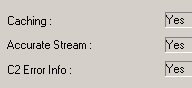
Exact Audio Copy can tell us a lot about a drive's capabilities. You can see from the screen shot that the Plextor PX-716A supports accurate stream, caches audio data and has the ability to retrieve C2 error information from audio CD's.
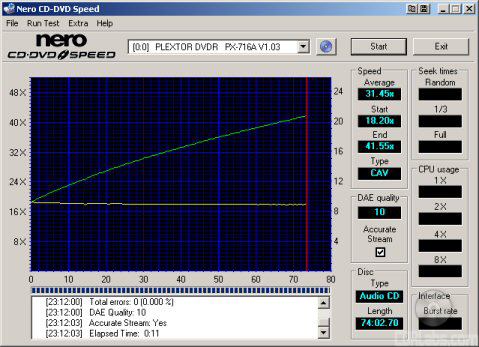
| CD Speed | Plextor PX-716A |
Sony DRU-710A |
Pioneer DVR-A08XL |
NEC ND-3500A |
| Average: Start: End: DAE Quality: Accurate Stream: |
31.45x 18.20x 41.55x 10 Yes |
36.76x 21.40x 48.56x 10 Yes |
31.10x 18.01x 41.32x 10 Yes |
25.73x 14.97x 33.99x 10 Yes |
The PX-716A performed pretty well in our DAE tests. While it wasn't able to take the top spot in our tests, it had no problems ripping pressed audio CD's at 41x.
To get a better look at the quality of the extracted audio we use CD DAE. CD DAE is actually designed to be an audio ripping program. It converts the CD-DA on the CD to .wav files. We use it in our testing because it can also be used as a quick and easy way to test the quality. Where CD Speed tests the DAE as one large session, CD DAE extracts each CD track individually. It actually extracts each track twice and then compares them to check for any errors. Every error a drive creates could be a hiss or pop you would hear later in the audio tracks.
| CD DAE | Plextor PX-716A |
Sony DRU-710A |
Pioneer DVR-A08XL |
NEC ND-3500A |
| Average: Min: Max: |
29.6x 18.6x 40.2x |
31.5x 22.1x 47.6x |
27.8x 18.8x 40.2x |
23.5x 15.5x 33.3x |
| Errors | 0 | 0 | 0 | 0 |
While Plextor's new writer started out a little faster when extracting our test CD with CD DAE, its average and maximum speeds were slower than what we saw with CD Speed.
CD DAE and CD Speed v3.61 - CD-R Media:
For this test I used a copy of the Pure Funk CD. It's burned onto the same NEC Gold 74 minute media I used in the CD Speed tests.
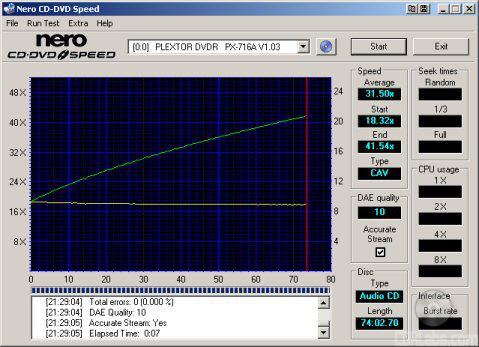
| CD Speed | Plextor PX-716A |
Sony DRU-710A |
Pioneer DVR-A08XL |
NEC ND-3500A |
| Average: Start: End: DAE Quality: Accurate Stream: |
31.50x 18.32x 41.64x 10 Yes |
36.52x 21.45x 48.23x 10 Yes |
30.80x 17.95x 40.85x 10 Yes |
25.49x 14.95x 33.62x 10 Yes |
The PX-716A was slightly faster when ripping audio CD-R discs. Unfortunately, even with this increase in speed, it wasn't nearly as fast as the Sony DRU-710A. So how did it do in CD Speed's advanced DAE tests? Take a look below.
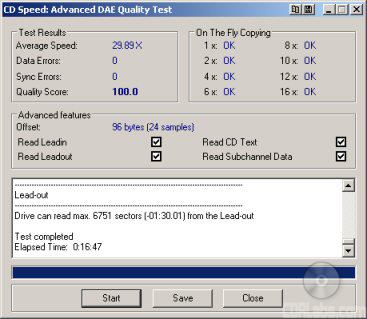
Plextor's new DVD writer completed CD Speed's advanced DAE tests with an average score of 29.89x. The drive had no problems passing all of the on-the-fly tests and did not create any errors. In the advanced tests, the PX-716A was able to read the CD-Text and subchannel data as well as the lead in and lead out sections of the CD.
| CD DAE | Plextor PX-716A |
Sony DRU-710A |
Pioneer DVR-A08XL |
NEC ND-3500A |
| Average: Min: Max: |
29.9x 19.1x 40.8x |
33.8x 22.1x 47.0x |
28.2x 18.7x 39.9x |
23.9x 15.5x 32.9x |
| Errors | 0 | 0 | 0 | 0 |
To see how well Plextor's new drive can read scratched and dirty discs, I used CD Speed's ScanDisc utility to see how many sectors were damaged or unreadable. This is a very rough, but good way to test the drive's error correcting abilities.

CD Speed - ScanDisc
The PX-716A handled scratched discs relatively well. By looking at the screenshot, you can see that the drive considered only 68.95% of the CD to be "damaged". More importantly, none of the sectors on the disc were unreadable.
You can also get an idea of how well the drive can read scratched and dirty discs by using CD DAE. CD DAE will extract the audio tracks twice and then compare them. From this information we can see what the drive's average speed was and how many errors it generated.
| CD DAE | Avg. Speed | Errors | % of Disc |
|
Plextor PX-716A |
23.2x | 57330566 | 7.31% |
|
Sony DRU-710A |
1.6x | 2012240 | 0.25% |
|
Pioneer DVR-A08XL |
15.9x | 45960691 | 5.87% |
|
NEC ND-3500A |
7.7x | 121388090 | 15.49% |
The PX-716A gave some mixed results in this test. While the scratches on the disc didn't slow the drive down very much, the number of errors was a little higher than what we'd like to see.
CD Write and ReWrite Tests - Nero Burning Rom 6.6.0.6 and DLA 4.60:
For this test I randomly generated 650MB and 700MB of files and directories to test the time it takes the drive to write and close a CD. All of the files are between 1MB and 25MB in size and no more than 10 directories deep. All of the times below include not only the actual writing time, but the lead in and out times too. This gives a more realistic idea of how long it takes to write a CD.

Like the drives from Sony and NEC, the PX-716A has a maximum CD writing speed of 48x. To reach this speed, it uses CAV, or Constant Angular Velocity. With Imation's 48x media, the drive started writing at about 21.31 and reached a maximum speed of 48.73x at the end of the session. This gave Plextor's new DVD±RW an average writing speed of about 36.91x.
To test the PX-716A's writing times, I wrote our test data to some Taiyo Yuden manufactured Fuji media rated at 48x. The results are below.
| Size in MB | Size in Time | Plextor PX-716A |
Sony DRU-710A |
Pioneer DVR-A08XL |
NEC ND-3500A |
| 651MB | 74:02:55 | 2:38 | 2:41 | 4:02 | 2:50 |
| 701MB | 79:44:21 | 2:44 | 2:47 | 4:10 | 2:58 |
Plextor's new drive did very well in our CD writing tests. Thanks to its 48x CD writing speed, it was able to write an entire 650MB CD in 2:38. This is about 3 seconds faster than the Sony DRU-710A and a good 12 seconds faster than the drive from NEC.
To test the PX-716A's writing quality I used the Q-Check C1/C2 Test built into PlexTools Professional. This test can be used to give us the average, maximum and total number of C1, C2 and CU (uncorrectable) errors on a disc. For these tests, the drive's read speed has been set to 24x. For comparison, I've also included test results from Lite-On IT's KProbe2.
|
|
|
||||||||||||||||||||||||||||||||||||||||||||||||||||||||||||||||||||||||
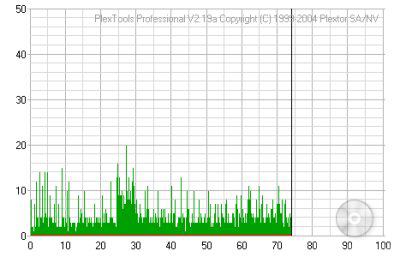
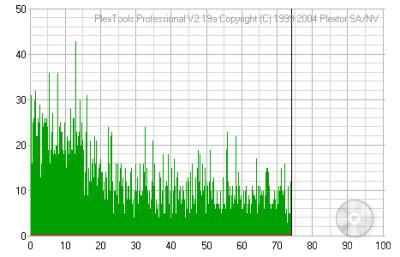

The PX-716A's writing quality was very good. By looking at the screenshots, you can see that the number of C1 errors stayed relatively low. More importantly, there were no C2 or CU errors on any of the discs I tested.
For the rewriting tests I created 400MB of files on the hard drive and wrote them in DAO mode using Nero. To test the packet writing speeds I copied and pasted the same files off the hard drive onto a CD-RW disc using DLA from Sonic. Verbatim's 24x Ultra Speed CD-RW media was used for these tests.
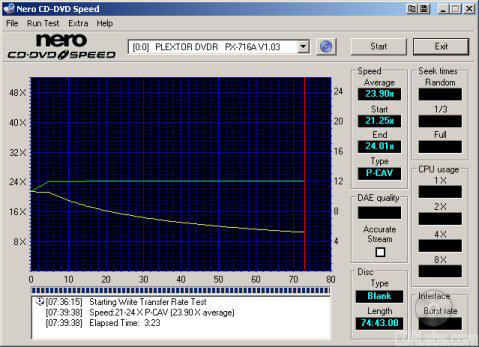
When rewriting at 24x, the PX-716A uses P-CAV, or Partial CAV, to reach this speed.By looking at the screenshot above, you can see that the drive starts rewriting at about 21.25x and accelerates, reaching its maximum speed at about the four minute mark.
| Software | Plextor PX-716A |
Sony DRU-710A |
Pioneer DVR-A08XL |
NEC ND-3500A |
| Nero | 2:21 | 2:51 | 2:57 | 2:42 |
| DLA Write | 2:25 | 2:42 | 2:39 | 2:25 |
| DLA Read | 2:24 | 2:20 | 3:50 | 1:37 |
Plextor's new DVD writer did pretty well in our rewriting tests. Thanks to its P-CAV writing method, the PX-716A took only 2:21 to write 400MB with Nero and 2:25 to do the same with DLA. Unfortunately, it was not as fast as some of the other drives when reading back our test data.
| Plextor PX-716A |
Sony DRU-710A |
Pioneer DVR-A08XL |
NEC ND-3500A |
|
| Quick Erase | 42 seconds | 44 seconds | 42 seconds | 44 seconds |
| Full Erase | 3:52 | 4:15 | 4:12 | 4:08 |
The PX-716A also erases at 24x. In our tests, it not only tied the DVR-A08XL for the best quick erase time, it was able to do a full erase in an impressive 3:52.
Nero CD Speed v3.61 - DVD-ROM:
A little editorial note here. Like a CD-ROM, you will get different benchmark results depending on what kind of discs you are using. You are probably going to get varying results from a full data disc to a single layer movie disc. You're also going to get different results for single and dual layer discs.
The DVD Speed website recommends using a single layer DVD-ROM disc with a capacity of at least 4GB. If you use a dual layer disc you probably won't get the best results because most DVD-ROM drives slow down to read them. Some even slow down to read single layer DVD-Video discs. To make a long story short, I am using a 4.37GB single layer, single sided disc for this test.
| Plextor PX-716A |
Sony DRU-710A |
Pioneer DVR-A08XL |
NEC ND-3500A |
|
| Transfer Speed Average: Start: End: |
12.07x 6.63x 16.14x |
12.18x 6.76x 16.28x |
11.99x 6.63x 16.03x |
11.90x 6.55x 15.91x |
| Seek Times Random: 1/3: Full: |
101ms 111ms 187ms |
107ms 119ms 190ms |
136ms 167ms 315ms |
117ms 137ms 202ms |
| CPU Usage 1x: 2x: 4x: 8x: |
4% 8% 16% 31% |
14% 11% 21% 95% |
6% 8% 14% n/a |
7% 13% 24% 46% |
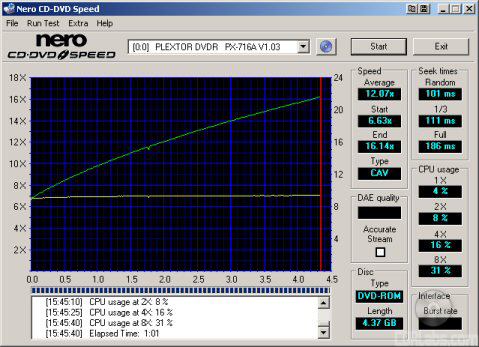
Like Plextor's previous DVD writers, the PX-716A performed very well when reading single layer DVD-ROM's. In our tests it started reading at 6.63x and reached a maximum transfer speed of 16.14x. While this wasn't enough to take the top spot in our transfer rate tests, its seek times were again quite good.
Nero CD Speed v3.61 - DVD-R and DVD-RW:
First, we'll look at the drive's DVD-R and DVD-RW reading performance. For this I made copies of our DVD-ROM test disk using some general use 4x DVD-R and 2x DVD-RW media from Verbatim and then ran our usual DVD read tests with CD Speed. The results are below.
Verbatim DVD-R
| Plextor PX-716A |
Sony DRU-710A |
Pioneer DVR-A08XL |
NEC ND-3500A |
|
| Transfer Speed Average: Start: End: |
9.04x 4.99x 12.09x |
6.07x 3.37x 8.12x |
9.36x 5.20x 12.51x |
11.91x 6.55x 15.92x |
| Seek Times Random: 1/3: Full: |
101ms 112ms 178ms |
96ms 112ms 194ms |
136ms 166ms 313ms |
123ms 179ms 264ms |
| CPU Usage 1x: 2x: 4x: 8x: |
4% 8% 15% 30% |
10% 10% 19% 93% |
13% 22% n/a n/a |
9% 15% 27% 49% |
Verbatim DVD-RW

| Plextor PX-716A |
Sony DRU-710A |
Pioneer DVR-A08XL |
NEC ND-3500A |
|
| Transfer Speed Average: Start: End: |
9.06x 4.98x 12.12x |
6.09x 3.37x 8.14x |
6.25x 3.46x 8.36x |
5.97x 3.29x 7.98x |
| Seek Times Random: 1/3: Full: |
101ms 114ms 197ms |
93ms 113ms 183ms |
138ms 168ms 331ms |
117ms 156ms 235ms |
| CPU Usage 1x: 2x: 4x: 8x: |
5% 8% 15% 30% |
8% 9% 18% 94% |
11% 22% n/a n/a |
7% 12% 23% 82% |
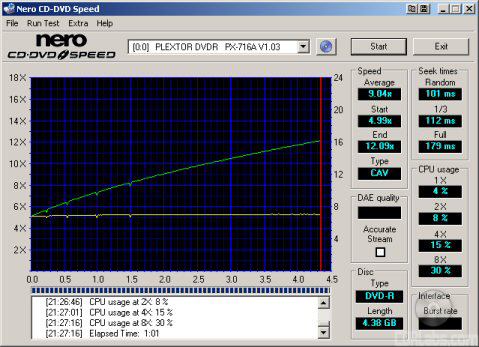
The PX-716A slowed down slightly when reading DVD-R and DVD-RW media. In both cases, it reached a maximum transfer speed of about 12x. This is pretty impressive, considering most drives read DVD-RW media at only 8x.
Nero CD Speed v3.61 - DVD+R and DVD+RW:
Next we'll look at the drive's DVD+R and DVD+RW reading performance. For this I made a copy of our DVD-ROM test disk using some 4x DVD+R and 2.4x DVD+RW media from Verbatim. I then ran our usual DVD read tests with CD Speed. The results are below.
Verbatim DVD+R

| Plextor PX-716A |
Sony DRU-710A |
Pioneer DVR-A08XL |
NEC ND-3500A |
|
| Transfer Speed Average: Start: End: |
9.04x 4.98x 12.09x |
6.18x 3.43x 8.27x |
9.36x 5.18x 12.51x |
11.89x 6.55x 15.46x |
| Seek Times Random: 1/3: Full: |
101ms 110ms 194ms |
102ms 117ms 191ms |
138ms 169ms 319ms |
119ms 164ms 156ms |
| CPU Usage 1x: 2x: 4x: 8x: |
5% 8% 15% 30% |
9% 12% 19% n/a |
12% 16% n/a n/a |
7% 14% 25% 47% |
Verbatim DVD+RW
| Plextor PX-716A |
Sony DRU-710A |
Pioneer DVR-A08XL |
NEC ND-3500A |
|
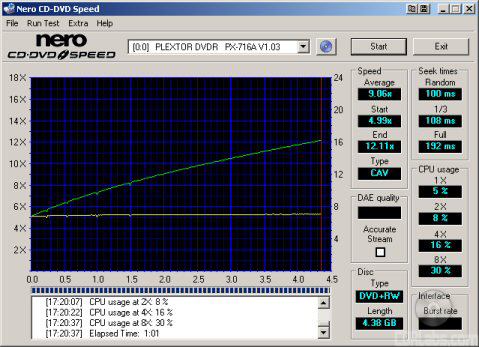
| Transfer Speed Average: Start: End: |
9.06x 4.99x 12.11x |
6.22x 3.45x 8.32x |
6.25x 3.47x 8.35x |
5.97x 3.28x 7.98x |
| Seek Times Random: 1/3: Full: |
100ms 108ms 193ms |
102ms 112ms 192ms |
138ms 165ms 316ms |
117ms 158ms 234ms |
| CPU Usage 1x: 2x: 4x: 8x: |
5% 8% 16% 30% |
9% 12% 20% 97% |
9% 19% n/a n/a |
6% 12% 22% 82% |
The PX-716A's performance with DVD+R and DVD+RW media was very similar to what we saw with DVD-R and DVD-RW media. Here too the drive reached a maximum transfer speed of 12x.
Verbatim DVD+R DL
| Plextor PX-716A |
Sony DRU-710A |
Pioneer DVR-A08XL |
NEC ND-3500A |
|
| Transfer Speed Average: Start: End: |
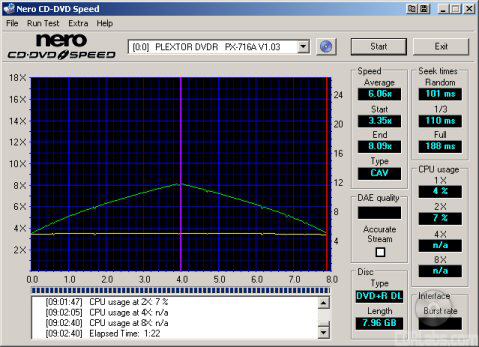
6.06x 3.35x 8.09x |
4.29x 2.39x 5.72x |
5.69x 3.17x 7.59x |
3.43x 1.91x 4.58x |
| Seek Times Random: 1/3: Full: |
101ms 111ms 188ms |
100ms 110ms 186ms |
143ms 168ms 321ms |
140ms 220ms 323ms |
| CPU Usage 1x: 2x: |
4% 7% |
5% 9% |
4% 7% |
7% 91% |
Plextor's new DVD writer had no problems reading Verbatim's double layer DVD+R media. While not as fast as the PX-712A/SA, the PX-716A reached an impressive 8.09x in CD Speed's transfer rate tests.
Nero CD Speed v3.61 - DVD-Video:
For these tests I am using the US version of Transformers: The Movie on DVD. The disc is over 4GB and single sided.
SpeedRead Disabled - "Quiet Mode"
SpeedRead Enabled

| Plextor PX-716A |
Sony DRU-710A |
Pioneer DVR-A08XL |
NEC ND-3500A |
|
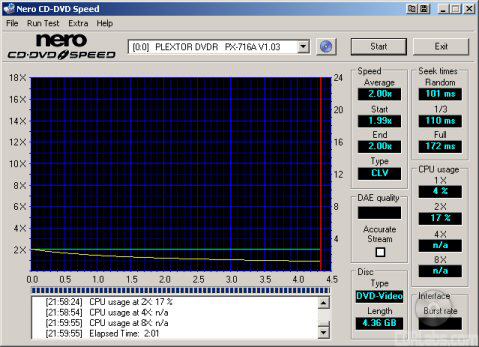
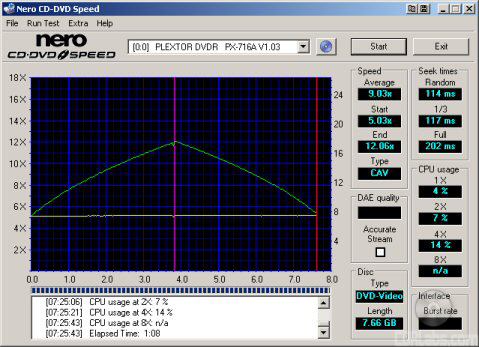
| Transfer Speed Average: Start: End: |
12.07x 6.63x 16.14x |
12.01x 6.66x 16.06x |
11.87x 6.58x 15.87x |
3.72x 2.05x 4.98x |
| Seek Times Random: 1/3: Full: |
103ms 111ms 179ms |
104ms 115ms 181ms |
135ms 162ms 312ms |
125ms 147ms 211ms |
| CPU Usage 1x: 2x: 4x: 8x: |
4% 8% 16% 31% |
14% 11% 22% 97% |
6% 8% 14% n/a |
7% 12% 21% n/a |
The PX-716A has two different modes when reading DVD videos. To reduce noise, the drive reads these discs at 2x by default. While this isn't very fast, you can increase the drive's maximum transfer speed by enabling SpeedRead. With SpeedRead enabled, the PX-716A was able to read single layer DVD videos at 16x and dual layer discs at 12x.
To see how well the PX-716A worked as a DVD player, I watched a few scenes from Transformers: The Movie and Star Wars: The Phantom Menace using WinDVD 4 and PowerDVD 5. Plextor's new drive had no problems playing back these movies with either program and was very quiet when SpeedRead was disabled.
DVD Write and ReWrite Tests - Nero Burning Rom 6.6.0.6 and DLA 4.60:
To test the DVD writing performance of the PX-716A I used Verbatim 16x DVD+R, Taiyo Yuden 8x DVD-R, Verbatim 4x DVD-RW and Verbatim 8x DVD+RW media. I created about 4GB of random files and directories on my hard drive and then burned them to our test discs with Nero. All tests have been run with AutoStrategy and PoweRec enabled.
|
|
|
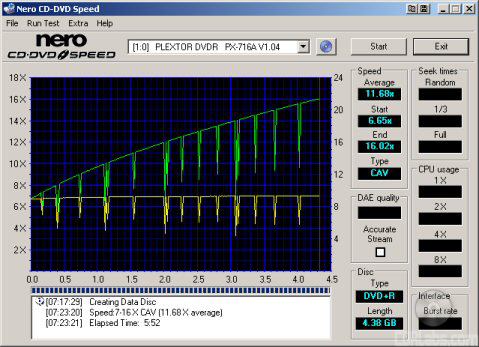
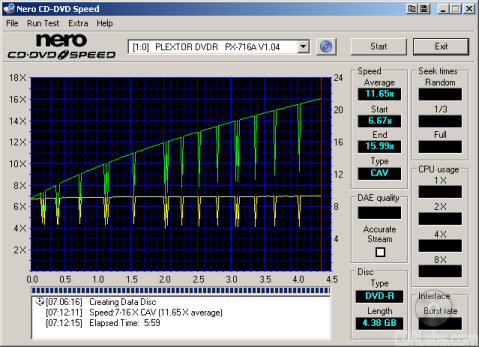
When writing to DVD+R and DVD-R media at 16x, the PX-716A uses CAV. By looking at the screenshots above, you can see that Plextor's new drive starts writing at about 6x and accelerates, reaching its maximum speed as it reaches the end of the disc.
|
|

The PX-716A is also one of the first drives to feature 8x DVD+RW writing speeds. To reach this speed, it uses P-CAV, or Partial CAV. The drive starts writing at 6x and accelerates, reaching 8x at about the 0.7GB mark.
| Plextor PX-716A |
Sony DRU-710A |
Pioneer DVR-A08XL |
NEC ND-3500A |
|
| DVD+R | 5:32 | 5:44 | 6:41 | 5:38 |
| DVD-R | 5:53 | 6:54 | 6:21 | 5:32 |
| DVD+RW | 6:48 | 12:33 | 12:55 | 12:33 |
| DVD-RW | 13:50 | 13:17 | 13:52 | 13:11 |
When writing to DVD+R media at 16x, the PX-716A is one of the faster drives we've tested. It was about 6 seconds faster than the drive from NEC and a good minute faster than the Pioneer DVR-A08XL. Thanks to its 8x writing speed, Plextor's new DVD writer also had the fastest DVD+RW writing time we've seen, beating the other drives by a sizable margin. Unfortunately, the PX-716A didn't do as well when writing to DVD-R media. Due to slow downs caused by PoweRec, it never really reached 16x, causing it to be about 20 seconds slower than the ND-3500A.
While Plextor has a good sized list of compatible media on their website, I wanted to see for myself how well the PX-716A worked with some of the DVD+R and DVD-R media currently available.
| Manufacturer ID | Max Write Speed |
Average Write Time |
|
| Memorex 8x DVD+R | CMC MAG E01 | 8x | 7:22 |
| RiDATA 8x DVD+R | RITEKR03 | 8x* | 9:21 |
| Taiyo Yuden 8x DVD+R | YUDEN000T02 | 16x* | 5:42 |
| Verbatim 8x DVD+R | MCC-003 | 12x* | 6:44 |
| Memorex 16x DVD+R | CMC MAG M01 | 8x | 7:26 |
| Optodisc 16x DVD+R | OPTODISCR16 | 16x | 5:33 |
| RiDATA 16x DVD+R | RITEKR04 | 16x* | 6:41 |
| Sony 16x DVD+R | SONYD21 | 16x* | 7:27 |
| Verbatim 16x DVD+R | MCC-004 | 16x | 5:32 |
| Fuji 8x DVD-R | FUJIFILM03 | 8x | 7:45 |
| Maxell 8x DVD-R | MXL RG03 | 8x | 7:38 |
| Memorex 8x DVD-R | CMC MAG.AE1 | 8x | 7:40 |
| Optodisc 8x DVD-R | OPTODISCR008 | 8x | 7:41 |
| RiDATA 8x DVD-R | RITEKG05 | 8x | 7:44 |
| Sony 8x DVD-R | SONY08D1 | 8x* | 10:24 |
| Taiyo Yuden 8x DVD-R | TYG02 | 16x* | 5:53 |
| Verbatim 8x DVD-R | MCC 02RG20 | 8x | 7:38 |
| Verbatim 16x DVD-R | MCC 03RG20 | 16x* | 6:06 |
The PX-716A's media compatibility was a mixed bag. While the drive wrote to a good portion of our DVD+R test media at 16x, only two types of DVD-R disc worked at this speed. The drive wasn't able to write at this speed all of the time either. In a number of cases, Plextor's PoweRec technology kept the drive from reaching the maximum available writing speed.
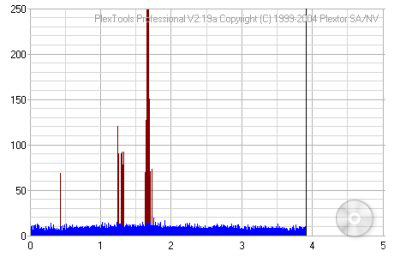
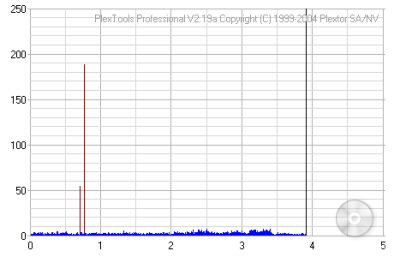
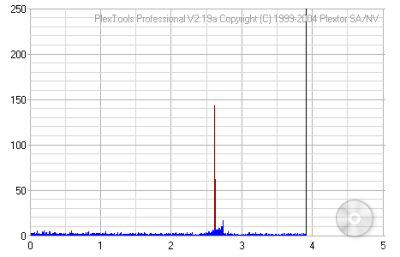
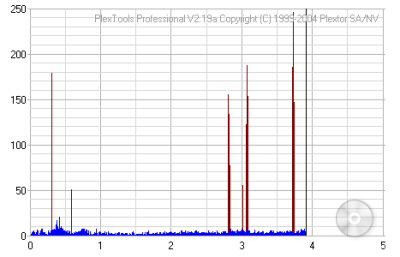
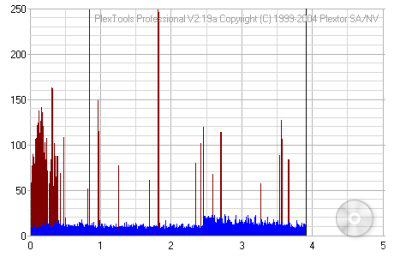
So what about writing quality? Testing a drive's DVD writing quality isn't easy. Until now, there were very few options, unless you wanted to shell out thousands of dollars for a certified test machine. Fortunately, we can test a disc's PI (Parity Inner) and PO (Parity Outer) rates using the PI/PO tests built into PlexTools Professional. For this review, we're going to use the Burst test run at 2x using "Middle Accuracy". This willgive us the number of PI Errors (before correction), PO Errors and the number of uncorrectable blocks (POF). I also tested the discs with KProbe2. As you'll see, the results are sometimes different than those of PlexTools.
So what are "good" results supposed to look like? Unfortunately, Plextor doesn't really say. However, it's generally accepted that with an ECC sum of 8, the number of PI errors should not exceed 280. Since POF errors are uncorrectable, we really don't want to see any at all.
|
|
|
||||||||||||||||||||||||||||||||||||||||||||||||||||||||||||||||||||||||

|
|
|
||||||||||||||||||||||||||||||||||||||||||||||||||||||||||||||||||||||||

|
|
|
||||||||||||||||||||||||||||||||||||||||||||||||||||||||||||||||||||||||
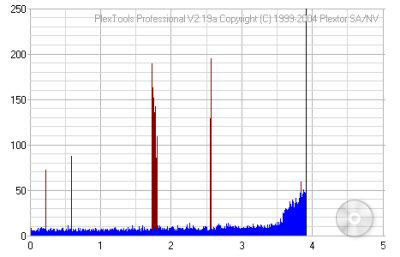
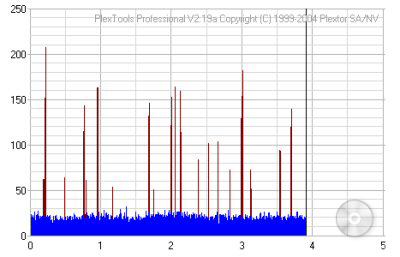
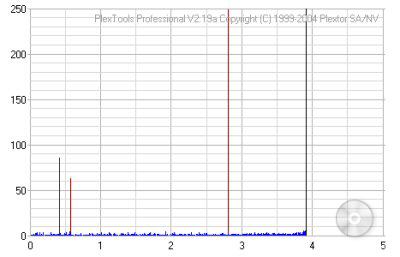
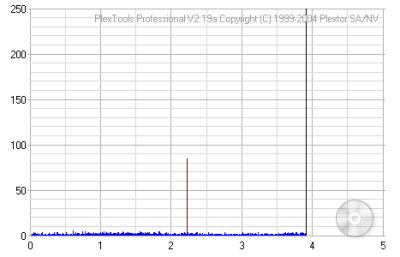
With earlier firmware versions, I was less than impressed with the PX-716A's writing quality. While the drive yielded good results at slower speeds, the PIE errors were pretty high on discs recorded at 16x. As you can see, that wasn't the case with the 1.04 firmware. While the number of PIE errors varied from one manufacturer to another, they remained well within acceptable limits. More importantly, there were no POF errors on any of the discs I tested.
|
|
|
||||||||||||||||||||||||||||||||||||||||||||||||||||||||||||||||||||||||

|
|
|
||||||||||||||||||||||||||||||||||||||||||||||||||||||||||||||||||||||||

|
|
|
||||||||||||||||||||||||||||||||||||||||||||||||||||||||||||||||||||||||
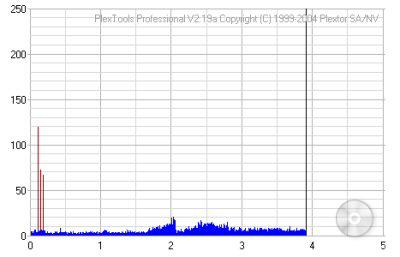

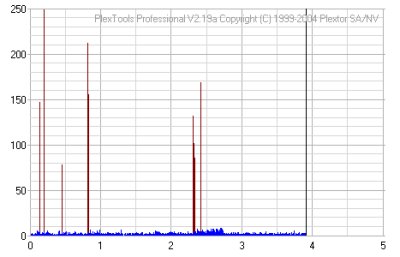
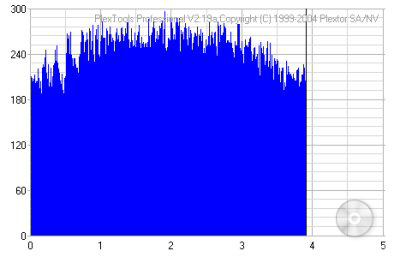
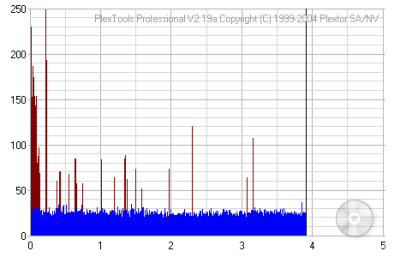
The PX-716A's writing quality was pretty good with most of the DVD-R media we tested. The only exception being the 8x DVD-R media from Memorex. As you can see, the number of PIF errors was pretty high across the entire disc.
So what about AutoStrategy? Is it nothing more than a marketing gimmick or does it really work? To find out, I first had to locate some media that worked with this new technology. This was easier said than done considering how quickly Plextor adds support for new media. Digging through the stacks of media in the 'Labs, I finally found a few discs that were, according to Plextor, supported by AutoStrategy.
First up, I tried some of Optodisc's 4x DVD+R (OPTODISC OR4) media. For a baseline, I wrote a disc with AutoStrategy off. With it off, the drive uses a default writing strategy. Next, I wrote a disc with AutoStrategy on. As you can see, it took about 2:25 to develop a writing strategy for the media. After this, I burned another disc with AutoStrategy on. With a writing strategy already created, the writing process was much faster. However, it was still about 10 seconds slower than with AutoStrategy off.
|
|
|
||||||||||||||||||||||||||||||||||||||||||||||||||||||||||||
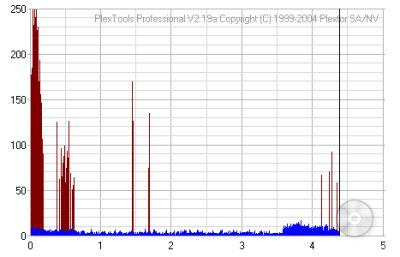
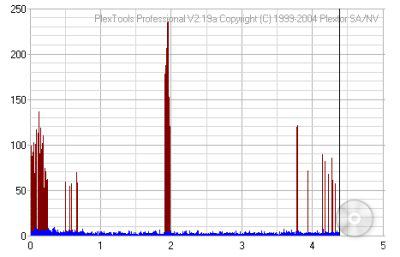
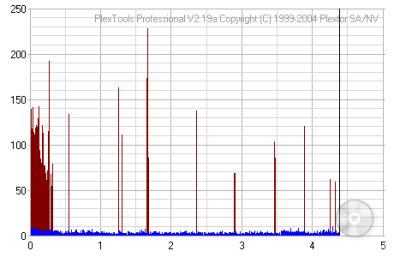
Comparing the first two results, you can see that the writing quality is slightly better with AutoStrategy on. This writing strategy also seemed to work on the third disc as the average number of PI and PO errors was very similar. Next we'll bump the writing speed up to 8x by using some of BenQ's 8x DVD-R (DAXON AZ2) media.
|
|
|
||||||||||||||||||||||||||||||||||||||||||||||||||||||||||||
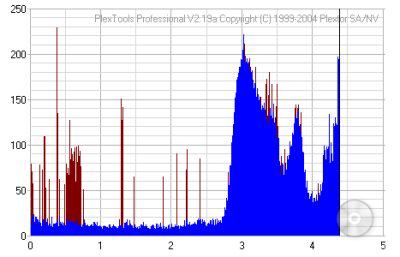
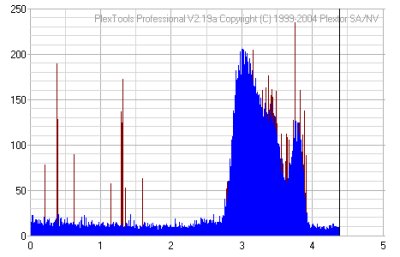
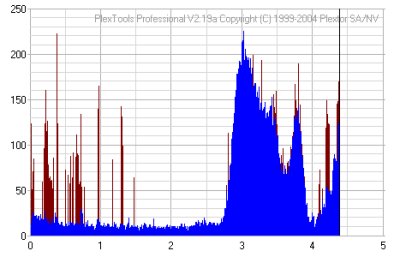
Unfortunately, AutoStrategy didn't work quite as well with this media. It not only took longer to develop a writing strategy, the results were less than impressive. Even after repeated burns, the number of PI and PO errors remained relatively high.
| Plextor PX-716A |
Sony DRU-710A |
Pioneer DVR-A08XL |
NEC ND-3500A |
|
| DVD+RW Quick | 32 seconds | 14 seconds | 29 seconds | 28 seconds |
| DVD+RW Full | 7:46 | 14:31 | 15:22 | 14:45 |
| DVD-RW Quick | 1:03 | 53 seconds | 57 seconds | 56 seconds |
| DVD-RW Full | 15:09 | 14:46 | 15:09 | 14:41 |
To test the PX-716A's packet writing performance I used DLA 4.60. Verbatim 8x DVD+RW and 4x DVD-RW media were used once again.
| Plextor PX-716A |
Sony DRU-710A |
Pioneer DVR-A08XL |
NEC ND-3500A |
|
| DVD+RW Write | 6:33 | 12:30 | 14:36 | 12:14 |
| DVD+RW Read | 5:47 | 16:43 | 13:06 | 10:19 |
| DVD-RW Write | 12:44 | 12:22 | 14:47 | 12:14 |
| DVD-RW Read | 6:05 | 14:33 | 13:33 | 10:42 |
Like Plextor's previous DVD writers, the PX-716A had some trouble with DLA. While the drive performed flawlessly with DVD+RW discs, it took longer than it should have to write our test data to Verbatim's 4x DVD-RW media. To get around this problem, I used the bundled packet writing software, Roxio's Drag-to-Disc.
Software issues aside, Plextor's new drive performed pretty well in our packet writing tests. While not as fast as some of the other drives when writing to DVD-RW media, its 8x DVD+RW writing speed gave it a definite advantage. Thanks to 12x DVD±RW read speeds, the PX-716A also took about 6 minutes to read back all 4GB of files and directories.
DVD+R DL Write Tests - Nero Burning Rom 6.6.0.6:
To test the double layer DVD writing performance of the PX-716A, I used DVD+R DL media from both RiDATA and Verbatim. I created about 8GB of random files and directories on my hard drive and then burned them to our test discs with Nero.
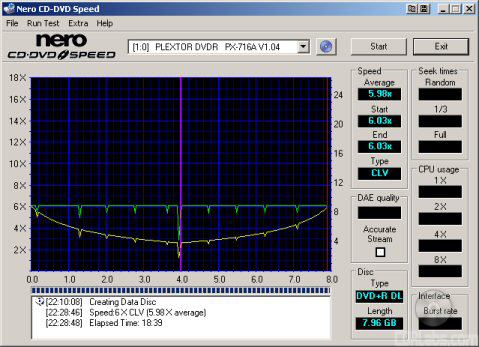
Out of the box, the PX-716A has a maximum DVD+R DL writing speed of 4x. With the 1.04 firmware, this speed is increased to 6x. Using CD Speed we can see that aside from the slight dip at the layer change, the drive writes at this speed from start to finish.
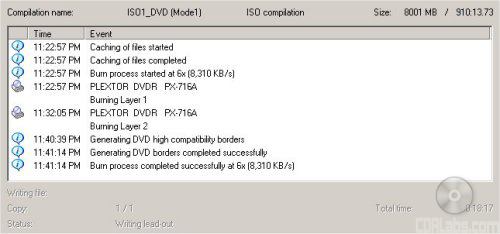
While Plextor's new drive had no problems writing to Verbatim's DVD+R DL media at 6x, RiDATA's discs would not work at anything faster than 4x. This is still pretty good though, considering most drives write to Ritek manufactured media at only 2.4x.
| DVD+R DL Write | Plextor PX-716A |
Sony DRU-710A |
Pioneer DVR-A08XL |
NEC ND-3500A |
| 2.4x | 43:42 | 43:10 | 43:33 | 42:37 |
| 4x | 26:47 | 26:37 | 26:34 | 26:26 |
| 6x | 18:17 | n/a | n/a | n/a |
The PX-716A had no problems taking the top spot in this test. Thanks to its 6x DVD+R DL writing speed, it took the drive only 18:17 to write 8001MB of data. If you do the math, this is a good 8 minutes faster than the drives from the competition. So what about writing quality? Take a look below.
|
|
||||||||||||||||||||||||||||||||||||||||||||||||||||||||

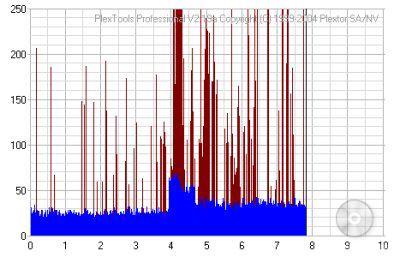
While Verbatim's discs are rated at only 2.4x, it's obvious they can handle much more. Even at 6x, the writing quality was quite good. Aside from the small spike at the layer change, the number of PI errors was very low from start to finish.The RiDATA discs didn't work quite as well. Looking at the results above, you can see that the PI errors were considerably higher. This didn't seem to have any effect on readability though, at least with the PX-716A.
Verbatim recently sent us a few samples of their new 4x DVD-R DL media. As one of the few drives to support this new media, I figured it would be worth going back and running a few tests with the PX-716A. While originally tested with firmware versions 1.03 and 1.04, our drive has been upgraded to version 1.06. This new firmware gives the PX-716A the ability to write to DVD-R DL at 6x.
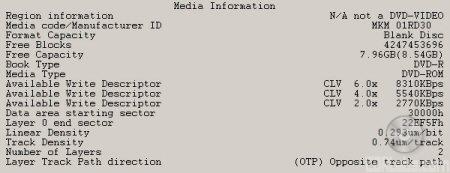
Using DVDINFOpro, we can see that the discs have a manufacturer ID of "MKM 01RD30" and will work at speeds as high as 6x. This is pretty impressive considering they're rated at only 4x.

The PX-716A had no problems writing to Verbatim's new DVD-R DL media at 6x. Using CD Speed we can see that aside from the dip at the layer change, the drive writes at this speed from start to finish.
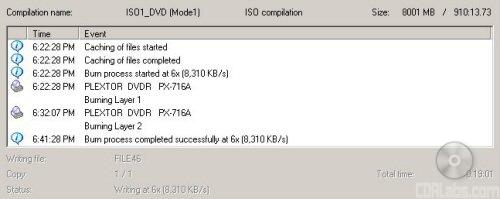
| DVD-R DL Write | Plextor PX-716A |
Pioneer DVR-A09XL |
| 6x | 19:01 | 22:42 |
The PX-716A did pretty well here. While not as fast as when writing to DVD+R DL discs at 6x, it was a good 2:40 faster than the Pioneer DVR-A09XL. So what about writing quality? Take a look below.
|
||||||||||||||||||||||||||||
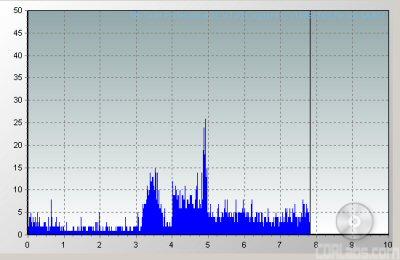
Testing went smoothly with PlexTools Professional XL. Looking at the graph above, you can see that the PI errors remained fairly low throughout the entire disc. Unfortunately, the Lite-On SOHW-1633S that I normally use with KProbe had some problems reading the disc. Instead of testing at 4x, the drive's actual read speed was closer to 2x. Nevertheless, it was able to complete the test.
Performance Revisited:
While the PX-716A still has a few rough spots, it performed pretty well overall. The drive flew through our DVD writing tests, turning in some impressive times with DVD±R, DVD±RW and DVD+R DL media. Plextor's new drive was also very fast when reading DVD's. In our tests, the PX-716A was able to read single layer data and video DVD's at 16x and most recordable media at 12x.
Plextor's new DVD writer also did very well in our CD read tests. With SpeedRead enabled, it was able to read pressed and CD-R media at speeds as high as 48x and had some very good seek times. The PX-716A also did very well in our DAE tests, reaching a maximum speed of 41x. Writing CD's wasn't a problem for the PX-716A either. The drive turned in some good writing times and its writing quality was quite good. With all things considered, the Plextor PX-716A gets a 9 out of 10 for the performance section of this review.
The PX-716A got off to a rough start when it was released this fall. Days after it hit stores, our forums were full of people complaining about writing quality issues. While this didn't look good for the self proclaimed "king of quality," Plextor was quick to respond with a new drive revision and a flood of firmware updates. These firmware updates not only addressed the writing quality issues, they improved the PX-716A, adding faster writing speeds and support for new formats like DVD-R DL.
The PX-716A is the first drive from Plextor with the ability to write to both DVD-R and DVD+R media at 16x. At this speed, the drive was able to write 4GB of data in as little as 5 and a half minutes. While we've seen a few 16x DVD writers that can do it in less time, they are few and far between. The PX-716A also performed very well with other types of recordable media. It held its own relatively well with DVD-RW media and turned in one of the fastest DVD+RW writing times we've seen. Even more impressive was the PX-716A's DVD+R DL writing performance. Thanks to its 6x writing speed, the drive took less than 19 minutes to burn an entire 8.5GB DVD! Unfortunately, due to the lack of media, we weren't able to test the PX-716A's DVD-R DL writing speeds.
When it came to media compatibility, Plextor's new drive gave us some mixed results. The PX-716A tried to write to a good portion of our DVD+R media at 16x, including some rated at 8x. Unfortunately, finding DVD-R media that would work at this speed wasn't as easy. Only two types worked at 16x and in both cases PoweRec had a tendency to kick in, preventing it from reaching this speed. On the other hand, the PX-716A's writing quality was, for the most part, quite good. With most of our test media, the number of PI errors stayed well within acceptable limits, even when writing at 16x.
The PX-716A also did very well in our DVD read tests. The drive was able to read single layer data and video DVD-ROM's at 16x and had some pretty good seek times. The PX-716A also reached some pretty impressive transfer speeds with other types of DVD media. In our tests, it read dual layer DVD-Videos, DVD-R/RW and DVD+R/RW discs at 12x and DVD+R DL media at 8x.
Reading and writing CD's wasn't a problem for the PX-716A either. With SpeedRead enabled, the drive read pressed and CD-R media at speeds as high as 48x and CD-RW discs at 41x. Plextor's new drive wasn't as fast in our DAE tests. However, it still ripped audio CD's at a respectable 41x. As a writer, the PX-716A performed as expected. The drive turned in some impressive times thanks to its 48x CD-R and 24x CD-RW writing speeds. More importantly, its writing quality was quite good.
The PX-716A is also one of the most feature packed DVD writers currently available. Along with features like BURN-Proof, PoweRec and VariRec, it supports a number of more advanced technologies like SecuRec, Q-Check and GigaRec. Thanks to Taiyo Yuden's new AutoStrategy technology, the PX-716A can also develop writing strategies for unknown media on the fly. While we saw a slight improvement in writing quality with AutoStrategy enabled, those of you that stick to supported media will probably have little use for this feature. Plextor tops all of this off with a great software bundle containing Roxio's Easy Media Creator suite and PlexTools Professional.
Of course, performance and features like this don't come cheap. With prices on Pricegrabber ranging from $115 to $150, it's still one of the more expensive 16x DVD±RW drives currently available. At this price, you could pick up one of the new 16x drives from NEC and Pioneer and still have money left over for media. Of course, if you go that route, you won't have nearly as many features or a company like Plextor backing you up. As usual, I'll leave the decision up to you.
| Plextor PX-716A 16x DVD±RW | |
| Features: Installation: Performance: |
10 9 9 |
| Overall: | 9 |
Highs:
- Writes to DVD-R and DVD+R media at 16x
- Writes to DVD+RW media at 8x
- Writes to DVD-RW media at 4x
- Writes to DVD+R DL media at 6x
- Writes to DVD-R DL media at 2x
- Reads single layer DVD-ROM's at 16x
- Reads DVD+R/RW and DVD-R/RW mediaat 12x
- Features 48x CD-R and 24x CD-RW writing speeds
- Excellent DAE speeds
- Good seek times
- Has an 8MB buffer and BURN-Proof to prevent coasters
- Supports GigaRec, SecuRec, PoweRec, VariRec, Silent Mode, AutoStrategy and Q-Check technologies
- Includes Easy Media Creator 7 and PlexTools Professional
- Supports bitsetting for DVD+R and DVD+R DL media
- Can write to select 8x DVD-R and DVD+R media at 16x
- Supports 99 minute media
- Great documentation
Lows:
- Tendency to slow down when writing to some DVD±R media
- Reads GigaRec recorded discs at only 8x
- Cannot set the book type of DVD+RW media
- Doesn't support the Mt. Rainier format
- Expensive