

- Details
- Network Storage
 Thecus Technology, the Creator in Storage, is constantly developing solutions to make life easier and more convenient for Thecus users. Today, Thecus is proud to unveil a new iPhone application dubbed Thecus Dashboard. This free-to-download application allows users to monitor the status of their Thecus NAS right from their iPhone, without having to boot up a computer.
Thecus Dashboard is a robust monitoring application for Thecus NAS devices. Once downloaded from the Apple App Store, users can easily discover and login to their Thecus NAS using their iPhone.
Once logged in, users have access to a multitude of device and service status information. Information such as firmware version, up time, CPU loading and even fan status can be displayed through Thecus Dashboard. Users can even check the status of the various services currently running on their NAS, including FTP status, network file server status, Nsync status, uPnP status and more. With Thecus Dashboard, making sure your NAS is running in tip top shape has never been easier or more convenient.
Add a comment- Details
- Network Storage
 QNAP Systems, Inc., a leading manufacturer of world class NAS (Network Attached Storage) servers revealed today the official QMobile application for Android 1.5, 1.6, and 2.1 platforms following the successful release of the app for iPhone users. The QMobile app, when used in conjunction with a QNAP Turbo NAS server and the V3.3.2 management software, allows users to stream music, digital pictures, and videos from their home NAS server and play directly on the Android handsets from anywhere, using Wi-Fi or 3G networks. This reduces the need to have the files synchronized and stored physically on the device while providing a simple and convenient way for mobile consumers to access their home content from anywhere.
QMobile's cool My Jukebox feature lets users remotely browse and select playlists created on the NAS to suit their mood by song title, artist, album, even ID3 tags. The QMobile app lets Android users upload pictures to a QNAP Turbo NAS and showcase pictures stored on the NAS on the mobile device. No more wishing you had added additional songs, videos, or pictures before a trip, so long as you have Internet access, you can play it remotely; it's like having a media center in your pocket!
- Details
- Network Storage
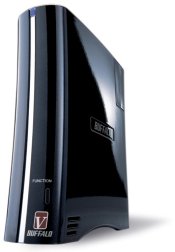 Buffalo Technology today announced a refresh on the highly popular LinkStation™ network storage family, representing the highest performing generation of Buffalo’s consumer orientated NAS solutions. The new high performance V-Series line consisting of LinkStation Pro, LinkStation Pro Duo and LinkStation Pro Quad, is based on industry-leading storage technologies, containing data management, remote access and content sharing features that make it the ideal NAS solution for the home or small business user.
“Protecting and managing digital content has always been a time consuming task for home and small business users,” said Ralph Spagnola, vice president of sales at Buffalo Technology. “With the new LinkStation V-Series family, users access and share their data twice as fast that they would with a standard NAS device.”
Each member of the new LinkStation V-Series family utilizes a 1.6 GHz processor, giving users unbeatable performance with network transfer speeds up to 76 MB/s, over twice the speed of competing network hard drives and significantly faster than USB 2.0 storage solutions. The dual drive LinkStation Pro Duo and the four drive LinkStation Pro Quad feature RAID redundancy for data protection and user removable quick swap hard drives for simple drive servicing without the need for tools. In addition, the LinkStation V-Series family can perform scheduled backups to an external USB hard drive or any other Buffalo NAS device, providing an exact copy of your data for an extra level of data protection or disaster recovery preparation.
- Details
- Network Storage
Fujitsu today launches the new CELVIN NAS Server Q800, providing an all-in-one system for local Network Attached Storage (NAS) backup and file sharing at an affordable price. The new system is targeted at mid-size and small business, plus home-office based workers that want to introduce flexible, centralised data sharing between computers and users on a local network.

For small and medium-sized businesses (SMBs), the CELVIN NAS Server Q800 model is a simple, secure and ultra-fast central store for frequently accessed data that is shared between multiple users – such as databases, customer records and e-commerce ordering systems. With the CELVIN NAS Server, Fujitsu is targeting businesses whose data is currently pooled using less robust or slower pools of storage, such as USB drives, and file server disks. By switching to a dedicated NAS server, customers can expect fast transfer rates and response times.
- Details
- Network Storage
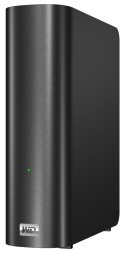 Western Digital today introduced its My Book Live home network drive, which gives consumers the fastest storage of and access to their content among consumer-grade network drives and provides a seamless set-up for centralizing a home's digital media. The drives present an easy and secure way to consolidate movies, music, and photos in one location while providing convenient access to digital content from multimedia devices in the connected home.
WD has leveraged the latest processor technology to deliver transfer speeds up to 100 MBps, more than triple the speed of traditional USB 2.0 drives and at least double the speeds of other network drives in its class.
My Book Live home network drive's built-in media server makes it a fast, simple solution for users who wish to view videos, music and images on any Mac® or PC connected to the home network and stream digital media to a television set through a DLNA®-certified multimedia device such as WD TV® Live Plus HD media player, Blu-ray Disc™ player, Xbox 360® or PlayStation® 3 game console. Users can also play music and videos stored on their drive in iTunes®, as well as view their digital photos on their iPhone®, iPod touch® and iPad™ with the swipe of a finger through the included WD Photos™ application. Users can also securely access and share all the content and files stored on the My Book Live from any Internet-connected PC or Mac using WD's free remote access service.


