

TRIM Performance:
While SSD's offer many benefits, there are some downsides to using flash memory. One of the biggest issues people run into is performance degradation. Over time, an SSD will run out of fresh blocks and will have to write over data the file system has marked as deleted. This procedure is very complicated and can slow an SSD's write speeds considerably.
To fix this problem, most manufacturers have added TRIM support to their SSDs. The TRIM command allows an operating system, such as Windows 10, to tell an SSD which data blocks are no longer in use. Using this information, the drive pro-actively erases these blocks and adds them to the free block pool.
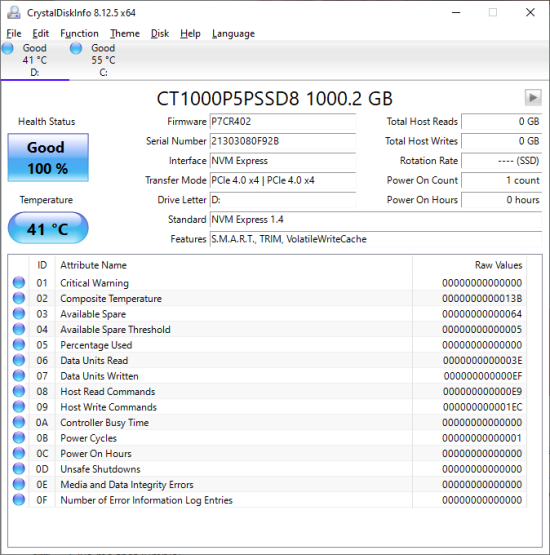
To test the P5 Plus's TRIM and garbage collection functions, I first put the drive in a "dirty" state. I used Iometer to fill 80% of the drive and then ran a random write test for 30 minutes. Looking at the screenshot below, you can see that the P5 Plus' average read and write speeds dropped to 778.19 MB/s and 1060.52 MB/s, respectively.
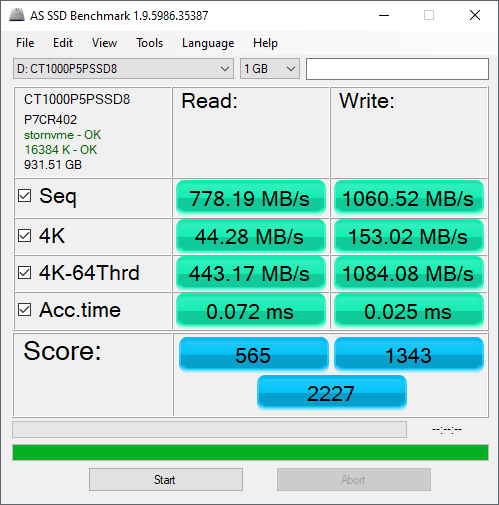
Crucial P5 Plus - Dirty
To see how well the P5 Plus could recover, I let the computer sit for about 30 minutes and then reran the test. The drive's average read speed climbed up to 5249.19 MB/s. However, its write speed lagged behind, averaging out at only 3682.06 MB/s.

Crucial P5 Plus - After TRIM
Lastly, I used Parted Magic to perform a secure erase on the P5 Plus. With the drive wiped clean, it had average read and write speeds of 2782.33 MB/s and 2513.49 MB/s, respectively.
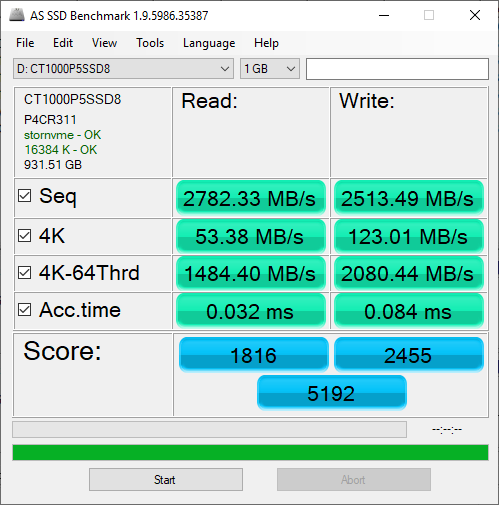
Crucial P5 Plus - Secure Erased


