

The test system used in this review is equipped with an Intel Core i7-6700K CPU, GIGABYTE GA-Z170X-UD3 motherboard, 32GB (16GB x 2) of Crucial Ballistix Sport LT DDR4 memory, Samsung 960 PRO 512GB SSD and a GIGABYTE GeForce GTX 1060 WINDFORCE OC 6G graphics card. For the operating system, I installed a fresh copy of Windows 10 Enterprise.
To test the performance of the Synology DS418j, I ran a series of benchmarks using CrystalDiskMark 3.0, ATTO Disk Benchmark 2.46, Iometer and the Intel NAS Performance Toolkit. The tests were first run using four WD Red 6TB NAS (WD60EFRX) hard drives configured as RAID 0, 10 and 5 volumes. The DS418j was connected to the computer using CAT6 ethernet cables and a gigabit Cisco switch.
CrystalDiskMark 3.0:
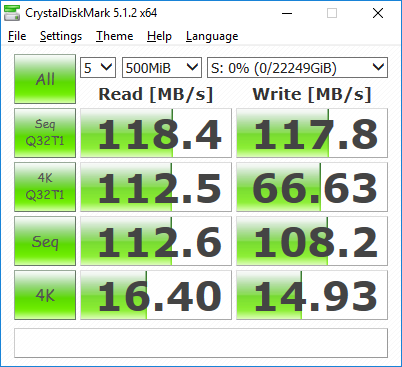
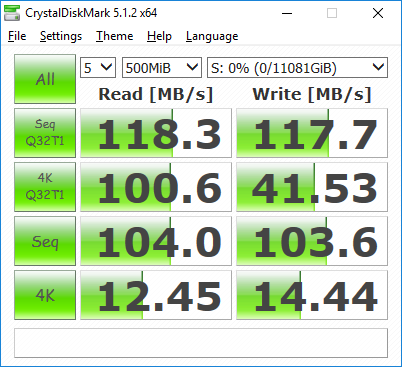
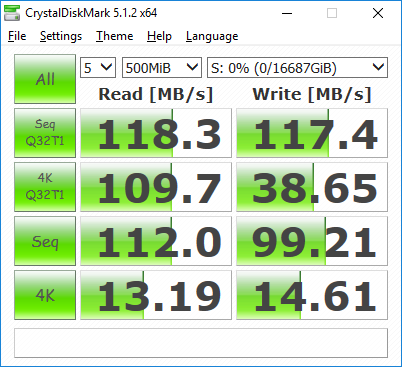
First, I ran a few quick tests using CrystalDiskMark. This benchmark tool measures the performance of a storage device by testing its sequential read and write speeds as well as its random read and write speeds using blocks 4KB and 512KB in size.
 RAID 0 |
 RAID 10 |
 RAID 5 |
According to Synology, the DS418j is capable of 112.94 MB/s read and 108.88 MB/s write speeds when connected to 1GbE network. Looking at the screenshots above, you can see that the NAS had no problems reaching these speeds in CrystalDiskMark's sequential read and write tests.
 RAID 5 - with encryption |
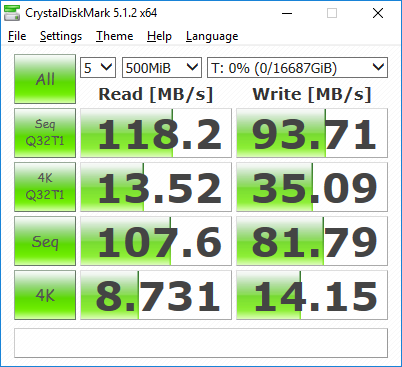
The DS418j also performed fairly well when doing encrypted file transfers. In our tests we were able to read at 118 MB/s and write at about 93 MB/s.
ATTO Disk Benchmark 2.46:
I also used ATTO Disk Benchmark to test the DS418j's sequential read and write speeds. The tests are run using blocks ranging in size from 0.5KB to 8192KB and the total length set to 32MB and 256MB.
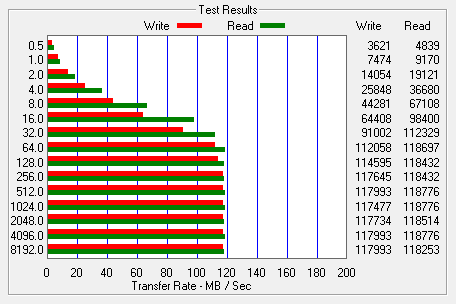 RAID 0 |
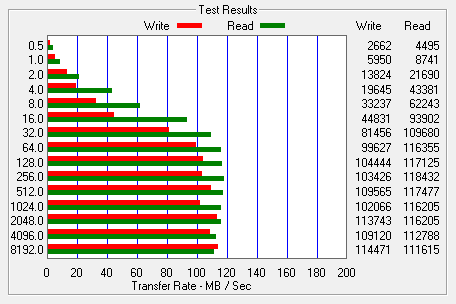 RAID 10 |
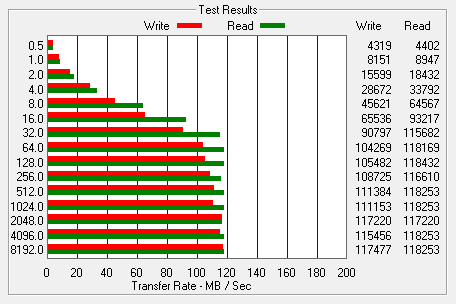 RAID 5 |
The DS418j's performance was about the same when tested with ATTO. With the four hard drives in a RAID 5 array, the unit topped out at 118 MB/s when reading and 117 MB/s when writing.
Iometer:
Next, I ran a series of tests using Iometer. This tool can be configured to benchmark a number of things. In this case, I used it to measure the DS418j's sequential read and write speeds using blocks ranging from 512B to 2MB in size. The tests were run using random bytes and a queue depth of 3.

The RAID configuration had very little impact on the DS418j's sequential read performance. In all three cases, the NAS was able to read at speeds as high as 111 MB/s.

The DS418's sequential write performance varied a bit when tested with Iometer. While it was able to write at more than 112 MB/s when configured for RAID 0, its write speed topped out at only 101 MB/s when using RAID 10.
Intel NAS Performance Toolkit:
The Intel NAS Performance Toolkit (Intel NASPT) is a file system exerciser and analysis tool designed to enable performance comparisons between network attached storage (NAS) devices. Intel NASPT focuses on user level performance using real world workload traces gathered from typical digital home applications: HD video playback and record, data backup and restore utilities, office productivity applications, video rendering/content creation, and more.
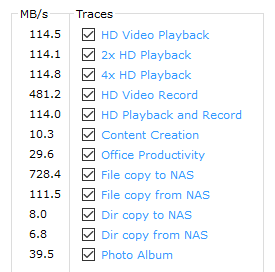 RAID 0 |
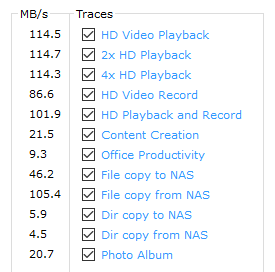 RAID 10 |
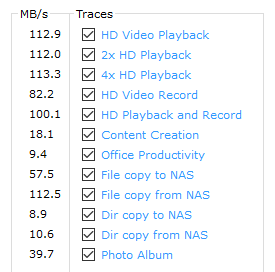 RAID 5 |
The DS418j reached some respectable speeds when streaming HD video and copying large files to and from the server. As with other NAS devices though, its transfer rates dropped considerably when creating content and copying directories full of small files to the NAS.
Final Thoughts:
While not the fastest or most feature packed NAS to come through the 'Labs, Synology's DiskStation DS418j delivers a lot of bang for your buck. Powered by a 64-bit dual-core 1.4 GHz processor and equipped with 1GB RAM, this entry-level NAS provides decent performance as well as a host of useful features for home and personal use. Along with an easy to use web interface, the DS418j offers centralized, cross platform storage and backups, cloud synchronization, media streaming and remote access via Synology's QuickConnect service and mobile apps. For a NAS with a single gigabit network port, the DS418j also performed relatively well throughout our tests, reading and writing at more than 117 MB/s.
The only real issue I have with the DS418j is that you have to take the top off to access the hard drives. Given, the average home user is probably just going to load their NAS up with hard drives and not look at it again, but this is a nice feature to have and is found on other entry-level NAS devices like the Thecus N4350 and QNAP TS-431P.
One thing the DS418j definitely has going for it is its price. It currently goes for $299 on Amazon, making it one of the more affordable 4-bay NAS devices on the market today.

Highs:
- Powered by 64-bit dual-core 1.4 GHz processor
- Four drive bays
- Supports SHR, RAID 0, 1, 5, 6, 10, JBOD and basic disk configurations
- File sharing and backups for Windows, Mac and Linux clients
- Gigabit Ethernet
- Supports USB 3.0
- Easy to use web interface
- Remotely accessible from web browsers and mobile devices
- Cloud synchronization
- Multimedia streaming
- Quiet operation
- Affordably priced
- Two year warranty
Lows:
- Cover must be removed before you can access hard drives
- Drive bays are not hot-swap
- Does not support video transcoding


