
- Details
- Network Storage
NETGEAR, Inc., a global networking company that delivers innovative products to consumers, businesses and service providers, today announced the new NETGEAR Developer Program, a revolutionary, simple way for developers to create new apps to help customers get more out of the millions of NETGEAR devices purchased every month. In an industry first, NETGEAR has created a huge opportunity for developers to produce apps by leveraging the NETGEAR Smart Network architecture built into an increasing number of its consumer and small-business devices, including a selection of routers, gateways and network-attached storage (NAS) devices.
Developers simply register at the NETGEAR Smart Network website at http://developer.netgear.com, where they can access all the Java®-based building blocks they need to create apps. NETGEAR makes it easy for developers to share or sell their apps through the NETGEAR genie+™ marketplace. For the first time, home and small business customers can remotely download apps directly to their connected NETGEAR devices just as they would to a smartphone or tablet – to expand functionality. No other network vendor offers an app development platform or app store for these types of devices.
"The first technology platform of its kind, the NETGEAR Smart Network is the foundation that will make the smart home a reality. The ability to run apps on devices that are always on and connected to the home network has been the missing link to bring the smart home out of science fiction and make it a reality for millions of consumers and small businesses around the world. We can't do it all on our own. Making the NETGEAR Smart Network a reality will be a joint venture with thousands of app developers and appliance manufacturers globally. We're looking forward to continually engaging new partners and offering new possibilities for consumers and small businesses to benefit even more from the networked world," said David Soares, senior vice president and general manager of the retail business unit at NETGEAR.
- Details
- Network Storage
Synology today announced a new partnership with Symform, a revolutionary cloud storage and backup service, to provide users with an alternative way to backup data. By installing the SymformBeta package from Synology Package Center, users can receive 10 gigabytes of free data backup, and up to 200 gigabytes free if they join and contribute excess local drive space to the Symform Cloud Storage Network, a globally distributed, peer-to-peer cloud storage network.
“Data protection is a top business concern for users who turn to Synology NAS servers for primary local backup,” said Wayne An, Product Manager of Synology Inc. “Our partnership with Symform and their distributed storage model is ideal for our community, and we believe it will bring added value to our users.”
“The cost of remote backup is one of the biggest challenges facing businesses today, even though data protection is the top IT priority for most companies. As a result, we’re making it easy and free to extend critical data in NAS devices to the Symform Cloud Storage Network,” said Margaret Dawson, vice president of product management and marketing at Symform. “Synology is a great partner to team up with on this offer because they understand the importance of keeping data safe and making data backup fast, reliable and affordable.”
- Details
- Network Storage
Synology Inc. today launched DiskStation DS413, a 4-bay NAS server that incorporates the latest technologies to minimize power consumption. It is well-suited for small and medium-sized businesses to centralize data backups and synchronize files across different platforms with minimum time and effort.
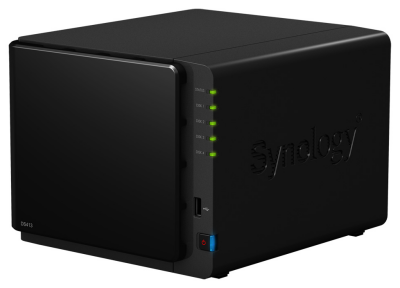
“Synology DS413 has emerged as an emblem of eco-friendly design and innovation, providing businesses with energy efficient data management solutions,” said Jones Tsai, Director of Hardware Design at Synology Inc. The DS413’s system hibernation mode is unparalleled within the industry. In this mode, the DS413 consumes merely 3.3 watts, and can be brought back to full operation within seconds via web access using Synology’s state of the art technology. In system hibernation mode, fans and hard drives also come to a halt, creating a completely quiet working environment. A further demonstration of outstanding power-saving design, the DS413 consumes only 13 watts and 35.6 watts respectively during hard drive hibernation and in full operation.
- Details
- Network Storage
 ioSafe aims to tackle data vulnerability and security in the private cloud market with the ioSafe N2, a disaster proof network attached storage (NAS) appliance powered by Synology® DiskStation Manager (DSM) aimed at the SOHO, SMB and Remote Office Branch Office (ROBO) markets.
The ioSafe N2 will provide end users with a disaster plan straight out of the box while enabling them to maintain complete ownership of their data and total control over how it is secured, accessed and backed up. The N2 is designed to provide all the benefits of the private cloud with fast local transfer speeds and none of the security risks and privacy issues associated the public cloud.
The high performance 2-bay N2 will provide up to 8TB of storage capacity and be equipped with a 2GHz Marvel CPU and 512MB memory. The N2 will use redundant hard drives as well as ioSafe's patented DataCast, HydroSafe and FloSafe technologies to protect data from loss in fire up to 1550°F and submersion in fresh or salt water up to a 10 foot depth for 3 days.
- Details
- Network Storage
NETGEAR, Inc., a global networking company that delivers innovative products to consumers, businesses and service providers, today announced NETGEAR RAIDiator 5.3.6, a firmware update for NETGEAR ReadyNAS Duo and NETGEAR ReadyNAS NV+ storage systems that enables users to access, manage and backup data in ways never before possible on a networked attached storage (NAS) device. NETGEAR RAIDiator 5.3.6 is a big leap forward enabling NAS users to stop putting their data in someone else’s cloud, as well as ensuring that Apple Time Machine users are backed up whenever they are connected to the Internet.
The inclusion of NETGEAR ReadyDROP in the firmware enables a secure personal storage cloud to be created featuring Dropbox™-like drag-and-drop file functionality without the storage limits, cost, access or security concerns associated with subscription-based cloud backup and synchronization solutions. Files stored securely on ReadyNAS Duo or ReadyNAS NV+ automatically synchronize across all enabled devices including PCs, Macs, Apple® iOS and Android handhelds. Users will be able to edit, store, retrieve and view files from any of the supported devices while knowing that their data resides on their own storage box, not in someone else’s cloud.
RAIDiator 5.3.6 also features remote backup for Time Machine®, which allows Apple® Time Machine® backups to be written directly to the NAS device through the Internet from any remote location and connected device. Until the introduction of this remote backup capability, users could only perform local backups and were required to pay a subscription fee for cloud backup. Now, Apple Time Machine users will remain backed up whenever they have an Internet connection without having to use someone else’s cloud.


